13.Files browser — Cmd+0
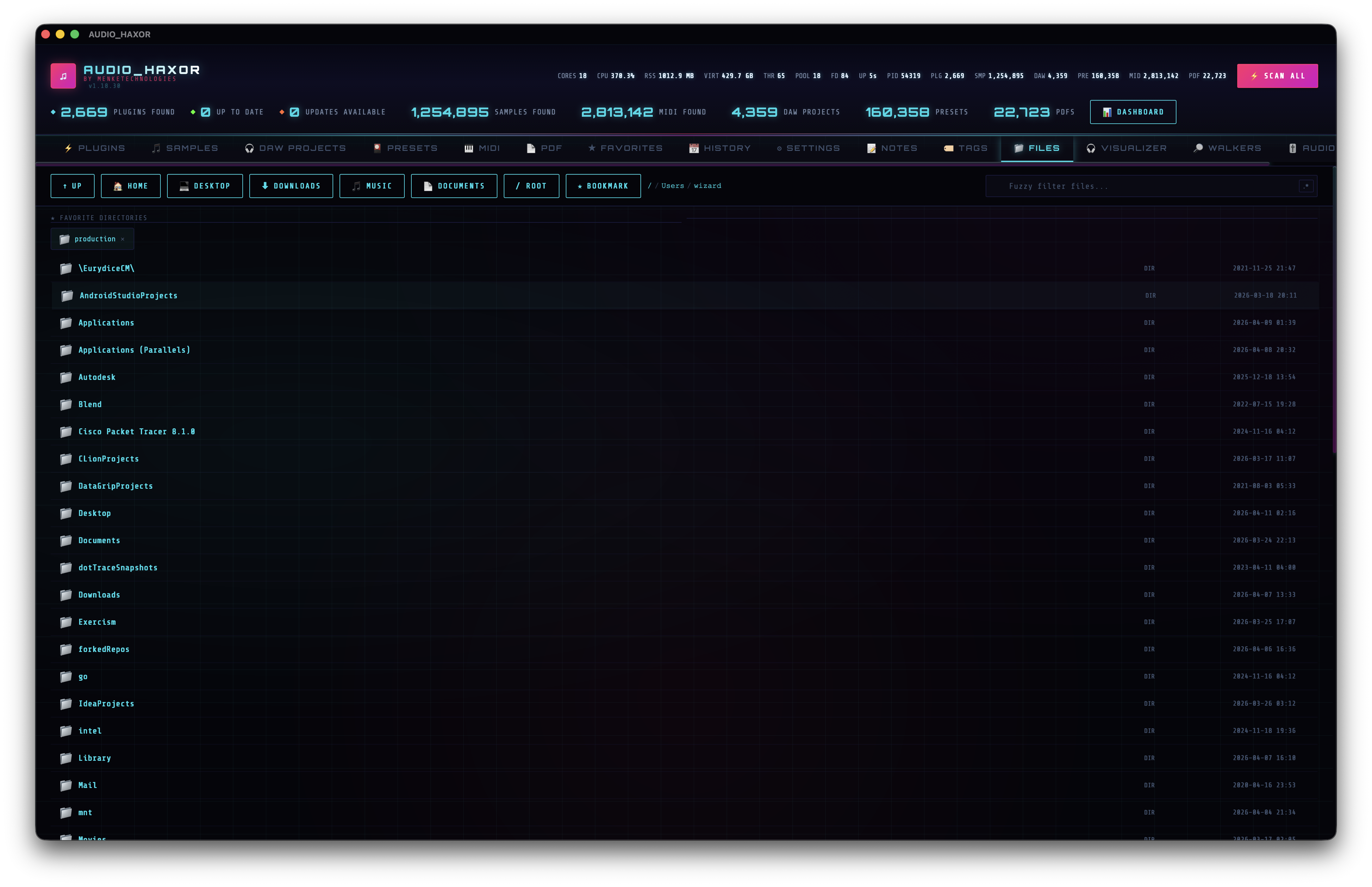
A raw filesystem window with breadcrumbs, quick-nav, directory bookmarks, lazy-rendered waveforms for audio files, and native drag-out to any app. Not a scanned inventory — a direct view.
Navigation
The header carries a full toolbar (frontend/js/file-browser.js):
- Up —
fileUp. Parent directory. - Home —
fileHome. Jumps toget_home_dirresult. - Quick nav buttons —
fileQuickNavwithdata-dir="Desktop",Downloads,Music,Documents. One click, one IPC call, one directory switch. - Bookmark —
btnFileFav. Toggles the current directory in your favorite-directories list (fileFavs). - Breadcrumb —
fileBreadcrumb. Each crumb is a clickabledata-file-navlink — jump straight to any ancestor.
Search & filter
Above the list: fuzzy search (fileSearchInput) with the regex toggle (regexFiles). Matches are highlighted and the list paginates in chunks of FILE_LIST_CHUNK = 80 rows to keep the scroll buffer snappy even in huge directories. A monotonic _fileListRenderSeq invalidates stale renders so switching directories mid-render never shows the wrong listing.
Bookmarked directories
The Favorite Directories strip (#fileFavs) sits above the list when you have any bookmarks. Each bookmark is a chip:
- Folder icon + directory basename (
.fav-chip-name) - Remove button (
data-remove-fav-dir)
Click a chip to jump straight there. The grid is compact — meant for the 4–8 directories you touch every day.
File list rows
Each file row is built by buildFileListRowHtml() (~line 198 of file-browser.js). Columns shown:
- Icon —
.file-icon, chosen by extension: 📁 folder, 🎵 audio, 🎛 DAW, ⚡ plugin, 📄 PDF, etc. - Mini waveform — for audio files, a
.file-waveformcanvas lazy-loaded by anIntersectionObserver(_fbWfObserver). The canvas decodes a few hundred peaks and draws an inline waveform strip. - File name — with search highlight.
- Extension chip — or "DIR" for directories.
- File size.
- Modified date.
- Meta badges — star (if favorited), note icon, tag pills, plus cached BPM / key / duration badges for audio files whose analysis is already in the cache. So scanned and un-scanned files look identical if they've been analyzed before.
Row actions
- Single click — select the row.
- Double click — for directories, navigate into them. For files, open in the default OS app via
open_file_default({ filePath }). - Right click — context menu with the full power-feature surface: Open in Default App, Reveal in Finder, Rename, Copy / Cut / Paste, Duplicate (
{stem} copy.ext), Make Alias (Unix symlink), Touch, Compress to .zip, Extract (.zip / .tar / .tar.gz / .7z), Run as Program, Open in External Editor, Get Info, Hash (SHA-256), Chmod, Symlink target editor, Find Similar, Find in Files, Find Duplicates, Color label (Finder 7 colors), Add to Favorites, Add note, Tag, Copy name / Copy path. The three deletion options (Move to Trash · Delete Permanently · Secure Delete — files only) come from the shared_pathDeleteItemshelper incontext-menu.jsand are mirrored into every inventory table row (audio / DAW / MIDI / preset / PDF / video) so the same three-option deletion surface is reachable from any tab. Secure Delete overwrites every byte of the file with zeros in 64 KiB chunks, fsync's, then unlinks — the confirmation dialog honestly states the SSD wear-leveling / APFS-btrfs-zfs copy-on-write caveats.
Multi-pane (1–4)
Total-Commander-style split view. Cmd+\ cycles the pane count 1 → 2 → 3 → 4 → 1; Cmd+Alt+1..4 jumps the active pane; the cyan left-border marks which pane the keyboard / commands target. Each pane has its own full state:
- Current path · entries · selection · scroll position
- Per-pane tab strip (drag any
.fb-tabto reorder; persists) - Sort column & direction · extension filter · hidden-files toggle · Spotlight-vs-name search mode
- Navigation history (
Cmd+[/Cmd+], capped at 50 entries)
Everything above lives in the fileBrowserPanesV3State persistence blob, so launching the app puts you back exactly where you left off — including the scroll position (restored once on first render via a one-shot _fbBootScrollPending flag, then 250 ms-debounced scroll save kicks in). Drag-resize gutters between consecutive visible panes (5 px wide, 80 px clamp on each side, double-click resets to 50 / 50). Hover the gutter for a ⇆ swap button that swaps every per-pane field at once. Trello-style pane reorder: drag the per-pane tab strip to permute pane positions — the resize gutters re-interleave and the active idx follows the moved content.
Sync scroll toggle scrolls every visible pane by the same scrollTop / scrollHeight ratio. Cross-pane Copy / Move Active Selection → Next Pane menu entries copy or move the current selection. Native HTML5 drag between panes uses a custom MIME type (application/x-audio-haxor-paths) so it doesn't clash with the OS-level drag-out; hold Cmd / Opt to copy, otherwise move.
Tree sidebar (Cmd+B)
Left rail collapsible folder tree. Roots = saved bookmarks + Home + /. Lazy expansion via the fs_list_subdirs Tauri command (subdirs only — much lighter than fs_list_dir since it skips file stat formatting). Expansion + visibility persisted in fileBrowserTreeExpanded and fileBrowserTreeVisible. The active folder is highlighted and the tree re-renders on every loadDirectory call so the highlight follows the main pane.
Inline previews
- Image thumbnails — lazy via
IntersectionObserver; server resizes to 64 px width via theimagecrate (HiDPI-sharp at 32 px display) and caches to SQLiteimage_preview_cachewith mtime-seconds invalidation. - Video thumbnails — macOS-only via the system
qlmanage -tutility (same tool Finder uses; Linux / Windows row falls through to the glyph). - PDF thumbnails — PDF.js + SQLite
pdf_preview_cache. - EXIF row badge — cheap 64 KiB read +
Exif\0\0magic search viafs_has_exif; cyan 📷 when present. - Git status badges — patched in place via
fs_git_status(git status --porcelain=v1 -z) with VSCode-convention coloring (orange modified, green added, cyan untracked, red conflict). - Color labels — Finder 7 colors + None; per-pane filter chip strip below the ext-filter.
Preview pane to the right of the list: full-size image with zoom (Fit / 100% / + / − buttons, Cmd/Ctrl + scroll-wheel zoom anchored to cursor, click+drag pan). For files with no typed preview, the pane shows a hex / binary viewer (xxd-style dump of the first 4 KiB; raw bytes via tauri::ipc::Response so the 0x80+ bytes don't get scrambled into U+FFFD by UTF-8 lossy conversion).
Power modals (right-click → menu, or Command Palette)
- Get Info — size + mtime/ctime/atime + perms
drwxr-xr-x+ uid/gid + xattrs (xattrcrate) + EXIF (kamadak-exif) + audio metadata fromaudio_samplesinventory + disk usage fromsysinfo. - Hash — single + bulk SHA-256 (
sha2, 64 KiB streaming chunks) with Copy All. - Chmod — single + bulk octal-mode entry (Unix).
- Diff Two Files — unified diff via the
similarcrate (4 MiB cap, binary rejected, red − delete / green + insert / dim equal). - Compare Folders — recursive 3-bucket tree diff (
fs_compare_dirs; 50 k entries/side cap; content-hashed when sizes match up to 16 MiB). - Find in Files — recursive grep (
fs_grep; skips binaries / dotdirs / >4 MiB; 500-result cap). - Find Duplicates — two-pass: group by
(size, ext), hash candidates, sort by reclaim potential, trash-all-but-first per group. - Symlink editor —
fs_symlink_retarget(atomic unlink + re-symlink). - Bookmarks manager — rename inline / ▲▼ reorder / ✕ delete.
- Quick Open — VSCode-style fuzzy palette over recent folders + files (
fileBrowserRecent, 200 cap). - Spotlight —
fs_global_searchcross-inventory FTS5 search acrossaudio_samples_fts+daw_projects_fts+presets_fts+midi_files_fts+pdfs_fts+video_files_fts; 150 ms debounce; grouped results; click → switch inventory tab + open in default app.
Auto-reload watcher
src-tauri/src/fb_watcher.rs: single-directory, non-recursive notify::RecommendedWatcher with a 300 ms Rust-side debounce that emits file-browser-change with {dir: canonical_path} to the frontend. Distinct from the inventory recursive multi-dir watcher. JS-side 150 ms reload coalesce on top of the Rust debounce so FSEvents bursts (create + chmod + rename ~50 ms apart on macOS) never trigger more than one reload per ~half-second of activity. Strict-equality on payloadDir === _fbWatchedCanonical so in-flight events from a folder the user navigated away from cannot cause a stale reload.
Native drag-out
frontend/js/native-file-drag.js. Files can be dragged into any other native application — a DAW, Finder, Terminal, Dropbox, you name it. Detection is pointer-based:
pointerdownon a row arms the drag.pointermovewith a delta > 8 px² triggersstartNativeFileDrag().- The drag cursor shows a custom 128×128 cyberpunk drag icon (neon border, scanlines, spectrum bars, generated on the fly in ~line 21–143).
- Drop anywhere outside the app to copy the file there (mode is always copy — read-only for the source).
- On success, a toast (
toast.fb_drag_started_n) confirms the count of items handed off to the OS. Previously the operation was silent on success — only failures were toasted — which made it look like nothing happened when the destination app rejected the drop.
If the dragged row is part of a batch selection (via checkbox), every selected path is dragged at once. This works in every inventory tab, not just the Files browser — the drag machinery is shared with Samples, DAW, Presets, MIDI, PDF, Plugins, Favorites, and Notes rows.
IPC surface (Files-specific)
The Files browser ships ~40 fs_* Tauri commands. The most-used subset:
fs_list_dir({ dirPath })·fs_list_subdirs({ dirPath })(tree sidebar) ·fs_get_infodelete_file·fs_secure_delete·move_to_trash·rename_file·fs_make_alias·fs_touch·fs_copy_pathfs_compress_zip·fs_extract_archive·fs_grep·fs_find_duplicates·fs_compare_dirs·fs_hash_sha256·fs_chmodfs_global_search(Spotlight) ·fs_has_exif·fs_git_status·fs_image_thumbnail·fs_read_head_bytes(hex viewer)fb_watcher_set·fs_symlink_retarget·open_with_app·open_file_default·get_home_dir