14.Scan history & diffs — F3
A merged sidebar of every scan run across every inventory type, a typed detail pane per run, and a diff view showing what was added or removed between two runs.
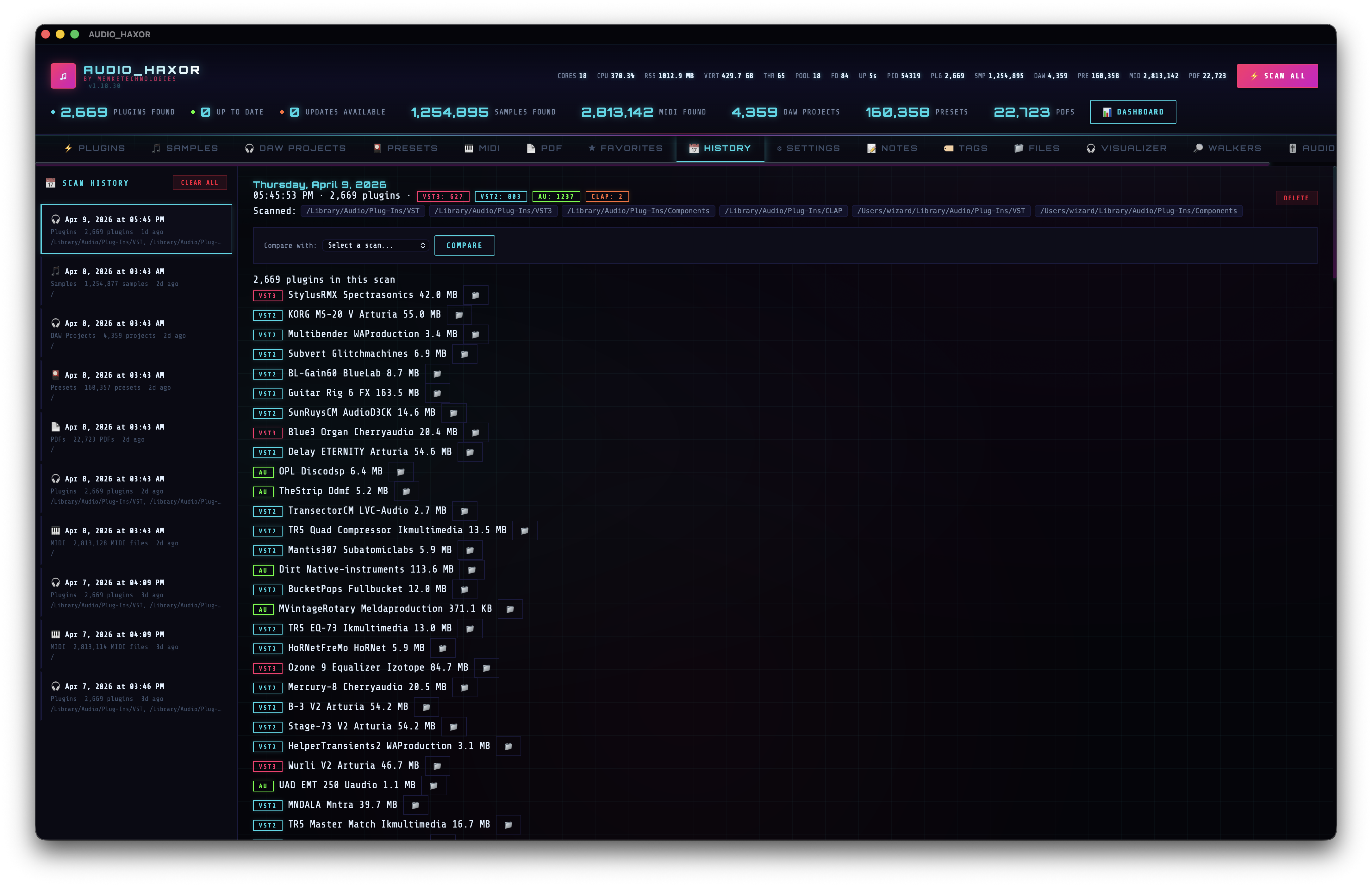
Layout
frontend/js/history.js. Two panes:
- Sidebar (
.history-sidebar) — scrollable list of all scan records, merged from every inventory type. Header has "Scan History" label and a Clear All button. - Detail pane (
#historyDetail) — right side, shows the selected run's full payload with a delete button and a compare dropdown.
Sidebar items
Each history row carries the following, built by buildHistorySidebarItemHtml(s) (~line 137):
- Timestamp — absolute date/time (e.g. "Mar 10 2026 3:45 PM").
- Scan type tag — colored label: Plugins, Samples, DAW, Presets, PDF, MIDI.
- Count — "42 plugins", "1,204 samples", etc.
- Relative time — "2 hours ago".
- Roots hint — hover to see the full root paths that were scanned.
- Selected state —
.selectedclass on the active row.
The sidebar renders in chunks of HISTORY_SIDEBAR_CHUNK = 100 to stay fast even when you have hundreds of runs.
Sidebar data sources
The sidebar is a merge-sort of six per-type lists:
historyScanList— plugins (fromhistory_get_scans).historyAudioScanList— audio (fromaudio_history_get_scans).historyDawScanList— DAW (fromdaw_history_get_scans).historyPresetScanList— presets.historyPdfScanList— PDFs.historyMidiScanList— MIDI.
fetchHistoryListsAndRender() (~line 75) fetches all six in parallel, merges into historyMergedList[], sorts by timestamp (newest first), and hands the result to the renderer. Selecting any row calls into a type-specific select*Scan() function that fetches the payload and populates the detail pane.
Detail pane — per-type
Each scan type has its own renderer but they share a common layout:
- Date header — weekday, month, day, year.
- Meta line — e.g. for plugin scans: "Scan: 3:45 PM, 412 plugins (VST2: 184, VST3: 192, CLAP: 18, AU: 18)". For audio scans: format counts instead of plugin type breakdown.
- Scanned roots — code blocks listing the root directories.
- Delete button —
deleteScanEntry, removes this specific run from the database. - Compare dropdown —
#compareSelect, lists every other scan of the same type with its count; pair with the Compare button (runDiff). - Diff results —
#diffResultscontainer, filled by the diff call. - Full item list — scrollable, lazy-loads 200 rows at a time. Columns differ per type:
- Plugins: type badge · name · manufacturer · size · open-folder.
- Samples: format badge · name · size · open-folder.
- DAW: format badge · name · size · date · open-folder.
- Presets: format badge · name · size · open-folder.
- PDFs: name · size · open-file.
- MIDI: name · size · duration · open-file.
Diffs
Select a reference run in the compare dropdown and click Compare. The frontend calls the type-specific diff IPC:
history_diff(oldId, newId)— plugins.audio_history_diff(oldId, newId)— samples.daw_history_diff(oldId, newId)— DAW.preset_history_diff,pdf_history_diff,midi_history_diff.
Each returns arrays of added and removed items. The UI renders two colored sections:
- Added —
.diff-section.diff-added— count badge + list. - Removed —
.diff-section.diff-removed— count badge + list.
If both arrays are empty, the pane shows a neutral "no differences" message via historyDiffMatchHtml().
Managing the archive
- Delete one run — the red button in the detail pane.
- Clear all history of one type — from the detail pane's controls or the per-tab settings.
- Clear all history (every type) — Settings → Clear all history or the sidebar's Clear All button.
- Automatic pruning — Settings → Prune old scan snapshots + Scan history to keep. On startup, runs beyond the last N per scanner are deleted.
Count field compatibility
Scan records have two possible count field shapes — legacy snake_case (plugin_count, sample_count, project_count, etc.) and current camelCase (pluginCount, sampleCount, projectCount, etc.). The helper historyScanCountField(s, camelKey, snakeKey) (~line 24) reads either format so upgraded databases keep rendering without migration.