11.Tray popover & menu bar
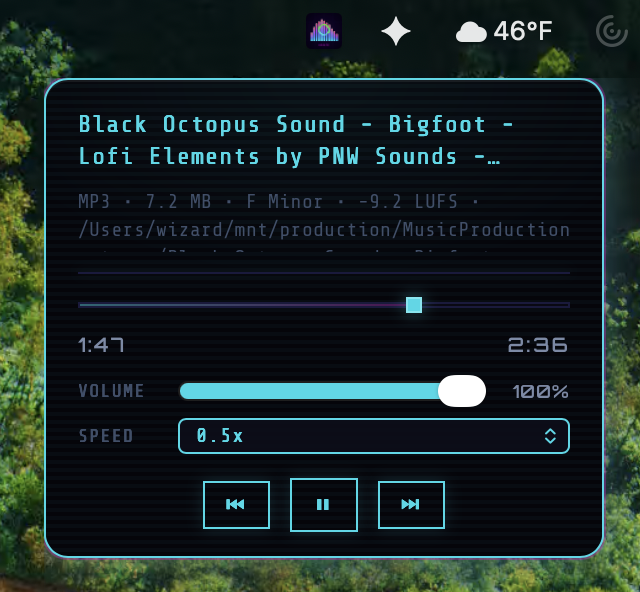
A separate WebView living in the macOS menu bar / Windows system tray / Linux panel. Track info, mini-waveform with playhead + sample-loop region overlay, scrubber drag, shift+drag paint-a-loop, volume, speed, transport, and full theme + color scheme sync from the main window.
Open the popover
Click the AUDIO_HAXOR icon in your menu bar (macOS) or system tray (Windows/Linux). On macOS this is a dedicated NSStatusItem managed by Tauri. The popover is a standalone WebView loaded from frontend/tray-popover.html and driven by frontend/js/tray-popover.js, completely separate from the main window process.
Right-clicking the tray icon opens the native OS menu with seven actions: Show AUDIO_HAXOR, Scan All, Stop All, Previous Track, Play / Pause, Next Track, and Quit (IDs tray_show, tray_scan_all, tray_stop_all, tray_prev, tray_play_pause, tray_next, tray_quit).
HUD layout
From top to bottom (IDs defined in frontend/tray-popover.html):
- Title —
#trayPopoverTitle. Two-line clamp with ellipsis. - Subtitle —
#subtitle. Three-line clamp. Cleared when redundant with the title (basename-only path matching the displayed name). - Idle hint —
#idleHint. Shows when no track is playing (falls back to thetray.popover_idlei18n string). - Scrubber bar —
#trackBarhosting the mini-waveform canvas (#trayWaveformCanvas), a translucent progress fill#fill, a vertical playhead#trackThumbspanning the full 28 px canvas height, and an optional sample-loop region overlay with yellow brace markers matching the main-window meta waveform. - Elapsed / total —
#elapsed/#total. Orbitron font,M:SSformat. - Volume row — label
#trayVolLabel, slider#trayVol(0–100), percentage#trayVolPct. - Speed row — label
#traySpeedLabel, select#traySpeed(0.25, 0.5, 0.75, 1, 1.25, 1.5, 2). - Transport —
#btnPrev◀,#btnPlay▶/⏸,#btnNext▶▶. - Build info —
#trayBuildMeta, version string populated fromget_build_info. - CRT wash —
.crt-wash— the signature scanline overlay gets its own copy here so the popover looks consistent with the main window.
State sync from the main window
Whenever playback changes, the main window calls update_tray_now_playing with a TrayNowPlayingPayload (defined in src-tauri/src/tray_menu.rs). The payload carries:
title_bar,tooltip,idle.popover_title,popover_subtitle,popover_idle_label.elapsed_sec,total_sec,popover_playing.playback_speed,volume_pct.waveform_peaks— flat[max0, min0, max1, min1, …]array sent once per track load; cached in_trayWaveformPeaksand only re-rendered when the signature actually changes.loop_region_enabled,loop_region_start_sec,loop_region_end_sec— sample-loop region overlay state.ui_theme— "light" or "dark".appearance— a map of CSS scheme variables (every key inSCHEME_VAR_KEYS) so the popover recolors to match your active color scheme instantly.
Rust relays the payload via emit_to("tray-popover", "tray-popover-state", emit); the JS side's applyState() normalizes snake/camel keys, updates every element, and re-bases the animation model. Theme changes emit tray-popover-ui-theme separately. SMB / network-share syscalls run in a separate task so they never block tray_popover_action; the Rust-side now-playing cache is mutated synchronously inside the action handler so the next state push reflects the latest seek/volume immediately.
Scrubber drag & shift-paint sample loop
The scrubber is a pointer-driven seek control:
pointerdownon#trackBarcaptures the pointer and sets_dragging = true.pointermoveupdates_dragFracfrom the mouse X coordinate.pointerup/pointercancelsendstray_popover_action { action: "seek:(4 decimal places, e.g." } seek:0.3425) and re-bases the animation model.
Shift+drag on the trackbar paints a new sample-loop region — release fires tray_popover_action { action: "loop_region_paint: with 4-decimal-place seconds, and the yellow brace markers appear over the canvas immediately. Shift+click a single point with no drag sends " }loop_region_disable to clear the region. The same loop region honored by the main-window player drives the tray overlay, so painting from the tray loops the running track without raising the main window.
The animation loop in animationTick runs at 60 fps while not idle and linearly interpolates between host state pushes using performance.now(), so the playhead moves smoothly even though the host only pushes state every ~500 ms.
Volume & speed changes
Both controls emit the same tray_popover_action IPC but with different action strings:
- Volume slider input →
action: "volume:(integer 0–100). Updates" #trayVolPcttext immediately, then fires the IPC. - Speed select change →
action: "speed:(float, 0.25–2.0)."
Transport & menu IDs
The popover's transport buttons emit the same menu-action IDs as the native menu bar and the tray context menu:
#btnPrev→send('prev_track')→ main windowprevTrack({ respectAutoplaySource: true })#btnPlay→send('play_pause')→ main windowtoggleAudioPlayback()#btnNext→send('next_track')→ main windownextTrack({ respectAutoplaySource: true })
The respectAutoplaySource flag means prev/next from the tray follow whichever autoplay source you chose in Settings (samples table vs player history) — unlike the floating-player buttons which always walk the history list.
Idle vs playing state
When idle === true, a .idle class is added to #shell. CSS then:
- Reduces opacity on progress / transport / volume / speed.
- Shows the idle hint text.
- Disables interaction on the transport buttons.
Theme & color scheme sync
When you toggle theme or change color scheme in the main window, applyTrayDocumentTheme(theme) sets document.documentElement.data-theme on the popover, which triggers the full cascade of light/dark CSS rules. The appearance map in the payload pushes per-variable overrides so custom color schemes also carry over — your tray popover always matches the main window, including mid-session scheme swaps.
Window sizing
syncWindowSize() measures the rendered #shell content plus padding and calls tray_popover_resize to update the popover's window dimensions. The body is allowed to shrink-wrap to its actual rendered shell — no min-height padding, no excess gutters — so the macOS NSPanel stays tight against the content. Bounds are clamped 240 – 520 px wide and 280 – 800 px tall on the Rust side. A ResizeObserver re-syncs on font load, text changes, locale swaps, and waveform-peaks delivery.
macOS Escape-key handling
The macOS NSPanel rarely becomes first responder, so a JS keydown for Escape never fires inside the popover. src-tauri/src/tray_popover_escape_macos.rs installs a local NSEvent monitor on app launch so pressing Escape anywhere while the popover is open closes it. On Linux / Windows, the standard keydown path closes the popover directly.