10.Floating player & transport
Waveform seek, three-band EQ, gain, pan, mono, speed, reverse playback, loop modes, A/B loop, shuffle, drag-reorderable history, and an autoplay chain that survives EOFs even when the WebView is throttled.
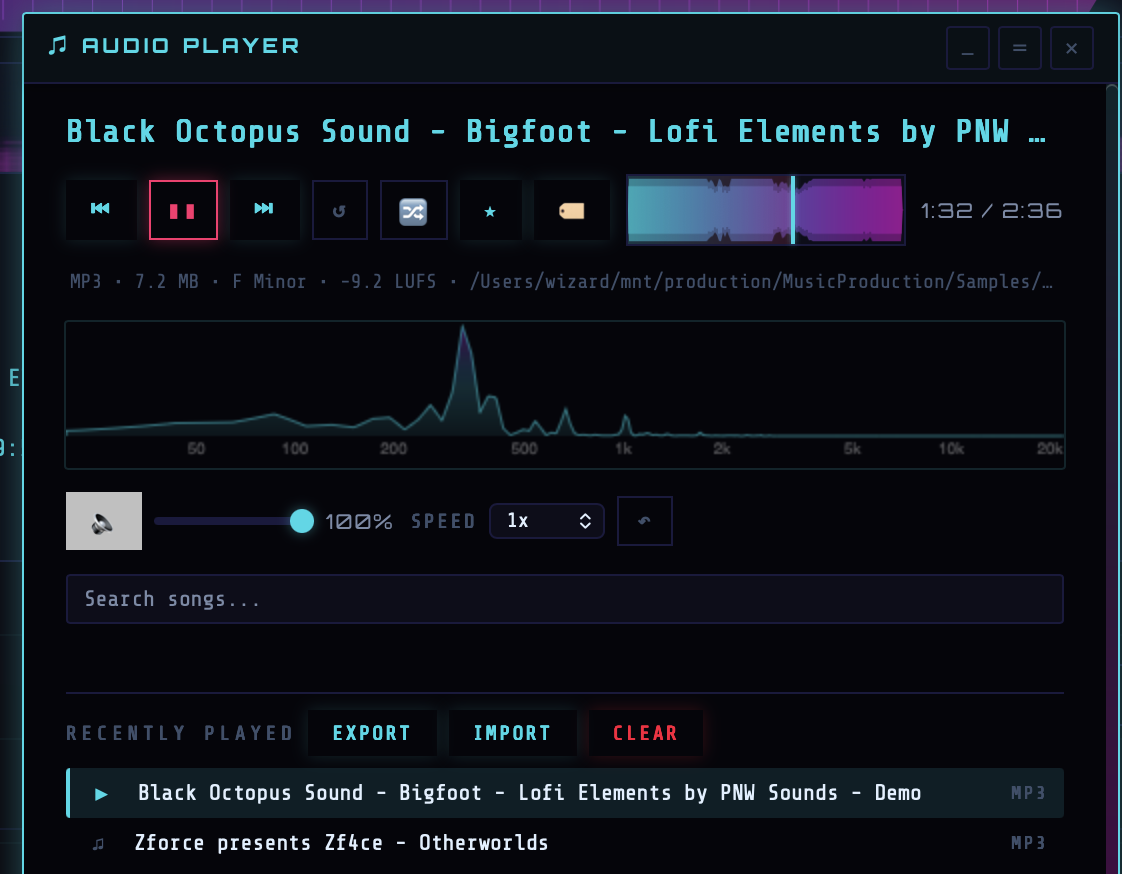
Where the player lives
The floating player is not a tab — it's a draggable, collapsible HUD panel owned by frontend/js/audio.js (7 600+ lines). It's where every preview-audio action ends up. Show or hide it with P. Collapse it to a compact pill with E (expand/collapse). Close it entirely with the × button (npCloseBtn). Drag its title bar to reposition; drag the resize handle to resize. Both position and size persist in prefs.
The player can also snap to a dock — drag it near any of the four corners and it locks to dock-tl / dock-tr / dock-bl / dock-br (playerDock pref). On every successful snap the app emits a toast.player_docked notification. Each of the player's interior sections (transport, waveform, EQ, history, …) is itself drag-reorderable — the order persists as playerSectionOrder and drops emit toast.reordered_np_sections.
Transport
- Play / pause —
npBtnPlay. ShortcutSpace. FunctiontoggleAudioPlayback()(~line 2845). - Previous / next —
npBtnPrev/npBtnNext. ShortcutsCmd+←/Cmd+→. FunctionsprevTrack(opts)/nextTrack(opts). The floating buttons always walk the player history list; shortcuts/tray/menu use{ respectAutoplaySource: true }so the order followsautoplayNextSource(either the player history or the visible Samples table). - Mute —
npBtnMute. ShortcutM. Persisted in prefs (audioMuted). - Volume —
npVolumeslider, 0–100. Value displayed innpVolumePct. PrefaudioVolume. ShortcutCmd+↑/Cmd+↓nudges ±5%. - Speed —
npSpeedselect. Preset values: 0.25×, 0.5×, 0.75×, 1×, 1.25×, 1.5×, 2×. In reverse-playback mode the effective range widens to 0.0625–16×. FunctionsetPlaybackSpeed(value)(~line 3579). - Reverse —
npBtnReverseandnpEqBtnReverse. Decodes the full file to an AudioBuffer, reverses the samples viareverseAudioBufferAsync()(yields every 250k samples so long tracks don't stall the UI), and plays the reversed buffer through the same EQ chain.
Waveform scrubber
The waveform canvas (npWaveformCanvas) is both a visualization and a seek surface. Pointer-down anywhere on the waveform seeks. The progress overlay (npProgress) fills as playback advances; the cursor (npCursor) marks the playhead; the time display (npTime) shows elapsed / total. The canvas is fed by the same decoded-peaks cache used by the Samples table expanded rows.
Loop modes
- Track loop —
npBtnLoop, shortcutL.toggleAudioLoop()(~line 2881) flips theaudioLoopingstate, persists to prefaudioLoop, and also syncs the flag to the AudioEngine subprocess viasyncEnginePlaybackLoop(audioLooping)for engine-mode playback. - A/B loop —
npAbAsets the loop start at the current playhead,npAbBsets the end,npAbClearclears it. ShortcutB. Start/end markersnpAbMarkerA/npAbMarkerBrender inside the waveform. State is held in_abLoop = { start, end }. - Shuffle —
npBtnShuffle, shortcutS. PrefshuffleMode. When on,getAutoplayNextPathAfter()picks a random next path from the current autoplay source.
3-band parametric EQ
Open the EQ section with Q (toggleEqSection(), ~line 998). The EQ chain is a cascade of Web Audio BiquadFilter nodes built inside ensureAudioGraph(). Three bands:
- Low —
npEqLowslider, range −12 dB to +12 dB, center ≈200 Hz, labelnpEqLowVal. - Mid —
npEqMidslider, range −12 dB to +12 dB, center ≈1 kHz, labelnpEqMidVal. - High —
npEqHighslider, range −12 dB to +12 dB, center ≈8 kHz, labelnpEqHighVal.
The EQ canvas (npEqCanvas) plots the combined frequency response in real time so you can see the curve you've sculpted. Drag the canvas resize handle (npEqCanvasResizeHandle) to grow or shrink the plot. EQ gains restore from prefs when a new track loads.
Preamp gain, pan, mono
- Preamp gain —
npGainSlider, 0 – 2 (0%–200%), labelnpGainVal. FunctionsetPreampGain(value)(~line 964). PrefpreampGain. Routed through a Web AudioGainNode. - Pan —
npPanSlider, −1 to +1. Label shows L, C, R with a percentage. Routed through aStereoPannerNode. PrefaudioPan. - Mono —
npBtnMono(M). ShortcutU. Implementation sets pan to 0 rather than doing a full ChannelMerger split so the CPU cost is trivial.
All three settings also push their values into the AudioEngine subprocess (playback_set_dsp) when engine-mode playback is active, so the engine path applies the same DSP as Web Audio preview.
Favorite / tag / note the current track
- Favorite current track —
npBtnFavtoggles the playing file in the favorites list (see step 12). - Tag / note current track —
npBtnTagopens the tag-and-note editor for the playing file.updateNoteBtn()(~line 4590) keeps the button's active state in sync with whether the track currently has a note or tags.
History list & filter
Below the transport lives the recently-played list (npHistoryList), built by getPlayerHistoryListItems() from the in-memory recentlyPlayed array. The array is hydrated from prefs on startup and capped by the Max recently played setting (20–500, default 50).
The list is drag-reorderable — reorder tracks to change playback order. Drops emit a toast.reordered_recently_played toast. Above it is a search input (npSearchInput) wired through the unified filter framework (registerFilter('filterNowPlaying', …)) — type to filter history + live sample search. Double-click any row to jump to that track.
The command palette (step 09) ships ready-made player track actions: Player → Play current, Player → Previous / Next, Player → Toggle loop / mute / shuffle, Player → Reverse current, Player → Show / hide / expand / collapse. Use these as a fallback when the player isn't focused (e.g. when the visualizer is active).
Autoplay chain
When the current track hits EOF, the 'ended' listener calls nextTrack({ autoplay: true }). Advance is gated on canAutoplayAdvanceTrack() — pref autoplayNext must be on. getAutoplayNextSource() chooses between player history and samples table based on pref autoplayNextSource.
If a preview fails (bad file, decode error), tryPreviewAutoplayNextOnFailureAsync(failedPath) chains forward along the same source — you can walk through a directory of corrupt files and the player will skip past them until it finds something playable.
When the WebView is hidden/minimized/unfocused, macOS throttles timers, which breaks the 'ended' event. Rust side compensates with an EOF watchdog (audio_engine_eof_watchdog_start) that polls playback status at 1 Hz and emits audio-engine-playback-eof; the JS listener forwards that to handleEnginePlaybackEofFromPoll() so the chain keeps advancing even with the app minimized.
On top of the EOF watchdog, the player also pins itself against macOS's App Nap: when an idle background app gets paged out, the first sample after a long idle would otherwise lag for seconds. A NSProcessInfo activity assertion holds the host unthrottled (the same option set Music.app uses), the audio-engine subprocess gets a 30 s keep-alive ping, and the playhead/cursor render loop drives a parallel setInterval at ~100 ms so the cursor doesn't freeze even when WKWebView throttles requestAnimationFrame to ~1 Hz on focus loss.
Engine mode vs Web Audio mode
Short previews use the browser's Web Audio pipeline (audioPlayer = HTMLAudioElement piped into the EQ chain). Longer or engine-routed playback uses the AudioEngine subprocess — the same DSP controls (gain, pan, EQ, speed, loop, reverse) apply either way because the JS layer mirrors every change into both code paths. See step 16 for the Audio Engine tab's direct controls.
Clear / export / import recently played
- Clear history — shortcut
Cmd+H. - Export history — from the player's settings menu, exports the
recentlyPlayedarray. - Import history — restore from a previously exported file.