04.Plugins tab
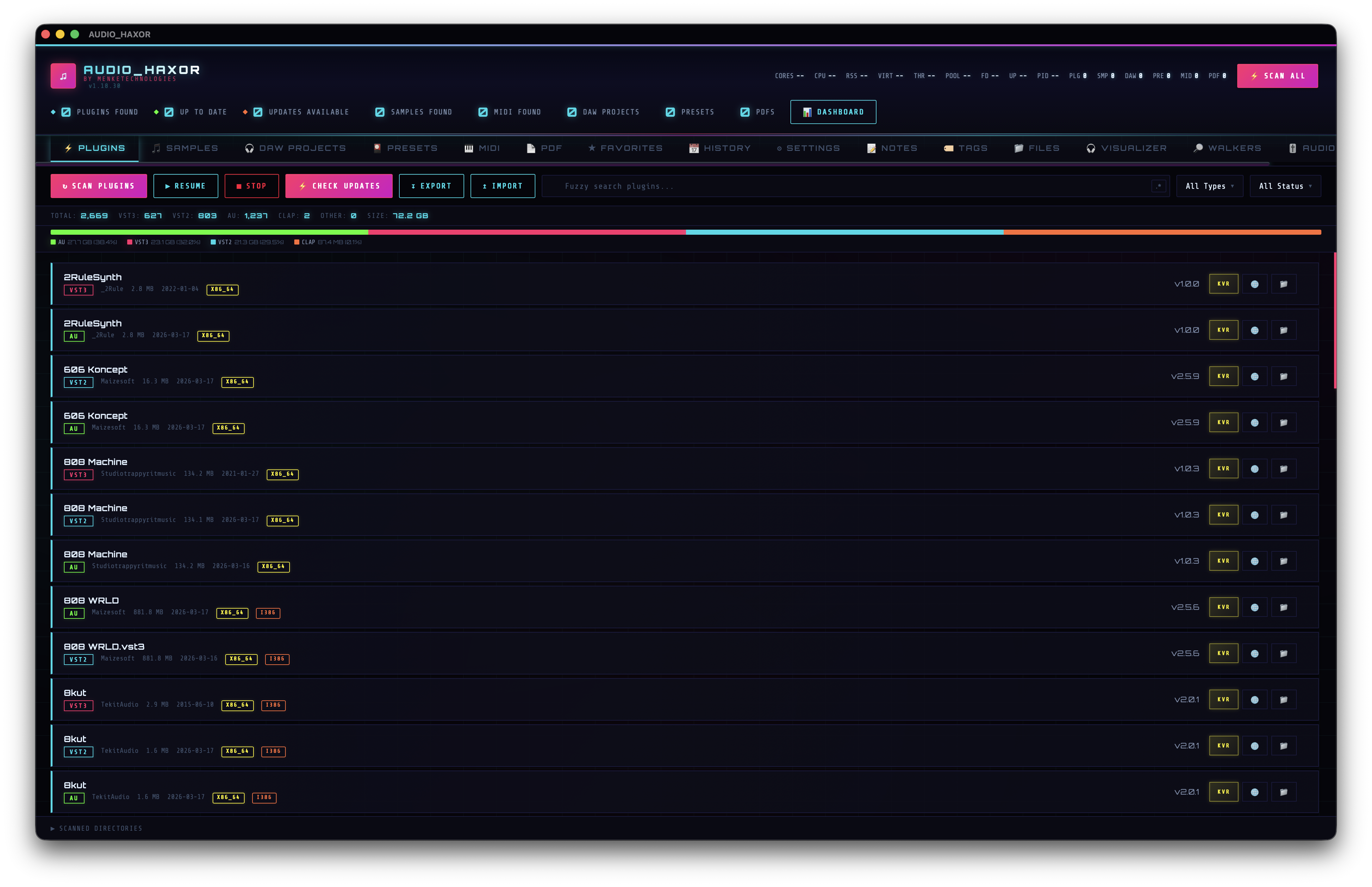
VST / VST3 / AU / CLAP inventory, status badges, KVR resolve & update queue, dependency graph, reverse xref, disk-usage strip. This is the tab AUDIO_HAXOR was born around.
Open the tab
Press Cmd+1 or click Plugins. The tab header exposes:
- Scan Plugins (
id="btnScan") — dispatchesscan_pluginswith{ customRoots, excludePaths }. While running the label becomes ⟳ X / Y + ETA. - Resume Scan (
id="btnResumeScan") — visible only if a previous scan was stopped partway. - Stop (
id="btnStopPlugins") — appears during an active scan. - Check Updates (
id="btnCheckUpdates") — dispatchescheck_updatesagainst KVR for every plugin. Disabled if no plugins have been scanned yet.
The plugin list — columns & status badges
Each row is built by buildPluginCardHtml() in frontend/js/plugins.js:416. Fields shown:
- Name — with search-match highlighting.
- Type —
VST2/VST3/AU/CLAP, rendered as a colored chip (type-vst2,type-vst3, etc.). - Manufacturer.
- Size — humanized (e.g. "2.3 MB").
- Modified — mtime.
- Architectures — one badge per slice found inside the plugin bundle (x86, x64, ARM64, etc.).
Three status categories drive the update badge (from pluginStatusCategory() at frontend/js/plugins.js:409):
- Update available —
badge-update. KVR says a newer version exists. - Up to date —
badge-current. KVR has a version string and it matches. - Unknown latest —
badge-unknown. KVR couldn't find the plugin by name / manufacturer.
Per-row actions
- Web (
btn-mfg) — opens the manufacturer URL. Disabled asbtn-no-webwhen KVR hasn't resolved a URL. - KVR (
btn-kvr) — opens the KVR product page. - Download (
btn-dl-kvr) — only rendered when an update is available; opens the download URL. - Folder (
btn-folder) — reveals the plugin bundle in Finder / Explorer / your native file manager.
Right-click any row for the context menu (Favorite, Add note, Copy path, Export selection, etc.). The delete sub-tree comes from the shared _pathDeleteItems() helper at frontend/js/context-menu.js:14 — every inventory row across the app (plugins, samples, presets, MIDI, PDF, video, files) gets the same items: Move to Trash, Securely delete (3-pass DoD 5220.22-M overwrite via the fs_secure_delete Tauri command at src-tauri/src/lib.rs:8567), and Copy path. Adding a new inventory tab automatically inherits the same menu.
Filters, search, and sort
- Search input — fuzzy search across name + manufacturer. Toggle the regex button (
regexPlugins) to switch from FZF to full regex. - Type filter — multi-select dropdown (VST3, VST2, AU, CLAP). Converted from a native
<select>into a cyberpunk multi-check widget byfrontend/js/multi-filter.js. - Status filter — multi-select (update, current, unknown).
- Sort — click any column header. Default: name ascending. State persists across launches via
sort-persist.js.
The query is dispatched to db_query_plugins({ search, type_filter, status_filter, sort_key, sort_asc, search_regex, offset, limit }). The tab paginates — you don't see all 20 000 plugins at once, you see the current page.
Disk-usage strip
At the top of the table is a compact disk-usage row (frontend/js/disk-usage.js, updatePluginDiskUsage() around line 124). It pulls aggregates from db_plugin_filter_stats and displays:
- Total count (or "X / Y" when a filter is applied)
- Per-type counts: VST3, VST2, AU, CLAP, Other
- Total size on disk
KVR resolve & update flow
KVR lookups are managed by frontend/js/kvr.js. The core flow (resolveKvrDownloads(), line 3):
- Deduplicate the plugin list by
manufacturer.toLowerCase() ||| name.toLowerCase(). - Skip any plugin whose key is already in the cache (loaded from
kvr_cache_get). - For each remaining plugin, call
resolve_kvr(kvrUrl, pluginName)— the Rust side fetches the KVR product page and extracts the current version and download URL. - Write results to the cache via
kvr_cache_update, and re-render each plugin card in place. - Rate-limit: 2 seconds between requests to stay polite.
While the queue runs, the header shows a status line like "3 downloads found · 18 pending".
Dependency graph — Cmd+G
Press Cmd+G (or the Show Dependency Graph action) to open the modal from frontend/js/dep-graph.js. It draws from the xref cache (_xrefCache, keyed by project path → plugin references) and exposes four views:
- Most Used — plugins sorted by how many projects reference them.
- By Project — projects sorted by plugin count, drill into each.
- Orphaned — plugins installed on disk that appear in zero projects.
- Analytics — breakdowns by type, manufacturer, extremes (biggest plugin chain, smallest, etc.).
The header shows unique plugins, projects indexed, total references, orphaned count. A fuzzy search box filters the active view. The xref cache itself is built by the Build plugin xref index action (see step 07) which walks every supported DAW project and parses its plugin references.
Import / export
- Export JSON —
export_plugins_json. - Export CSV —
export_plugins_csv. - Import JSON —
import_plugins_json. Merges into the live table. - Export plugin xref — writes the entire xref cache (project → plugin list) as JSON. Action
exportPluginXref, defaultCmd+Shift+J.
Scan history for plugins
Every plugin scan writes a snapshot to the plugin_scans table. Use the History tab (step 14) to inspect individual runs, compare two runs with Diff, or delete old entries. IPC: history_get_scans, history_get_detail, history_delete, history_clear, history_diff, history_latest.