03.Run Scan All & watch the Walkers tab
The unified scan pipeline, per-type scanners, the Stop / Resume-All header flow, and the live two-tile Walkers HUD that shows every worker's current directory in real time.
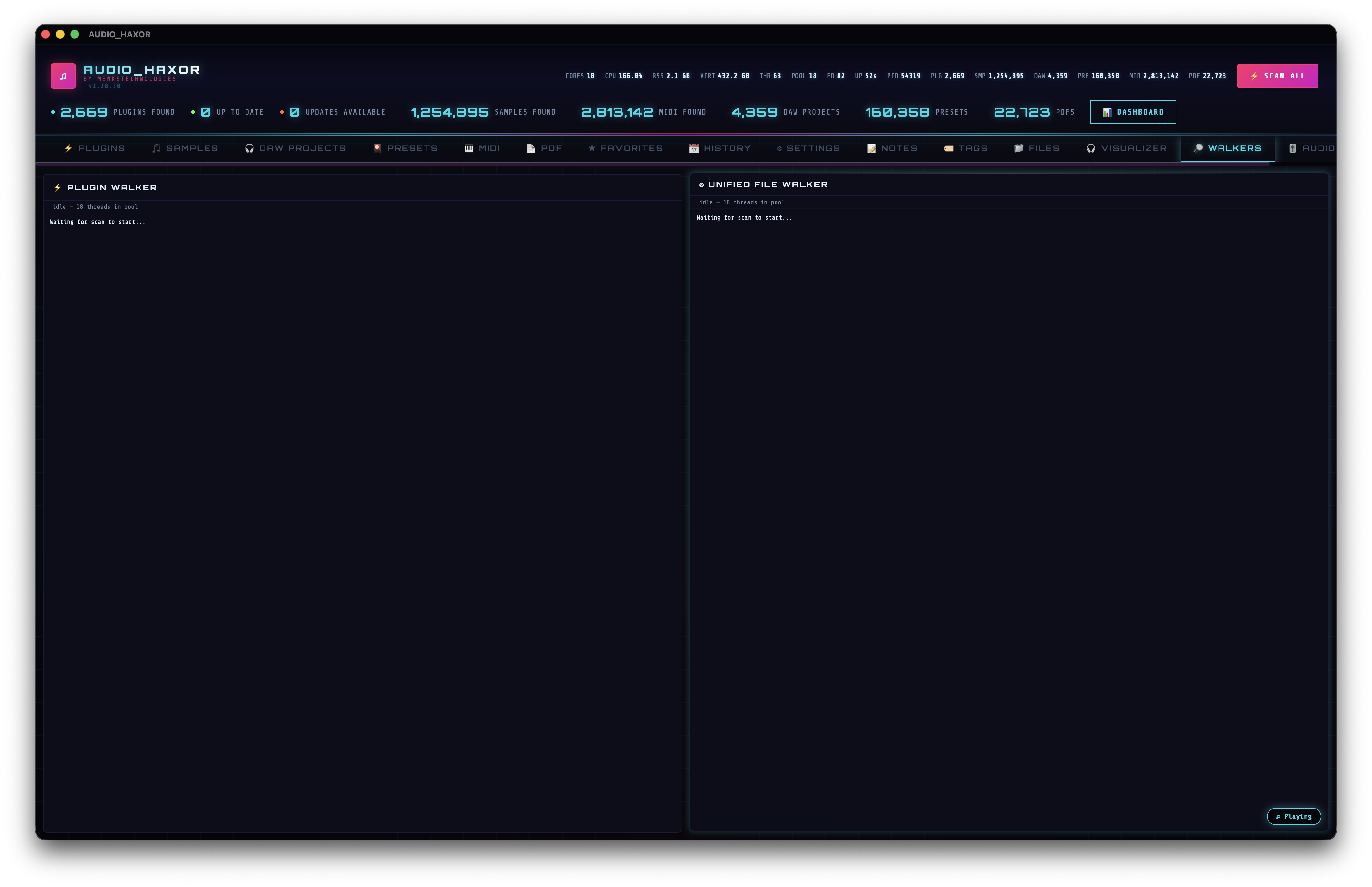
Scan All — the unified walker
Click the Scan All button (🗲) in the header to dispatch scan_unified. The Rust side (src-tauri/src/unified_walker.rs) performs a single filesystem pass over the union of every configured scan-root list, classifies every encountered file, and fans progress events into the same per-type event streams as standalone scans. This is dramatically faster than running six separate scanners — each directory is opendir'd once, not six times.
Before dispatching the scan proper, the frontend calls prepare_unified_scan to snapshot the root set and produce a deterministic scan-run ID you can reference later in the History tab.
Under the hood the scan is a Rayon-parallel walker — the thread count comes from Thread pool multiplier × core count (see step 02). Progress batches are rate-limited by the UI update throttle so the WebView doesn't drown in events.
Stop, resume, and the header state machine
- Scan All (
id="btnScanAll") — visible when idle. Dispatchesscan_unified. - Stop All (
id="btnStopAll") — visible during an active scan. Callsstop_unified_scanwhich signals every walker to abort gracefully at the next directory boundary. - Resume All (
id="btnResumeAll") — only visible when one or more walkers have been paused. Resumes by dispatching per-type scans with the stop flag cleared. - Scan status badge —
id="scanStatusBadge"— free-form status text (e.g., "Walking /Volumes/Samples (24k / ~180k)") streamed from Rust.
The Stop / Scan / Resume visibility is managed in frontend/js/app.js boot sequence (lines 87–143) and toggled in response to progress events.
Prefer a single-type scan? Each tab has its own button
Sometimes you just refreshed a DAW project and only need to re-index that directory. Every inventory tab has its own scan button that dispatches only that type:
- Plugins tab → Scan —
id="btnScan"→scan_plugins - Samples tab → Scan —
id="btnScanAudio"→scan_audio_samples - DAW tab → Scan —
id="btnScanDaw"→scan_daw_projects - Presets tab → Scan Presets —
id="btnScanPresets"→scan_presets - MIDI tab → Scan MIDI —
id="btnScanMidi"→scan_midi_files - PDF tab → Scan PDFs →
scan_pdfs - Videos tab → Scan Videos →
scan_videos
Each has its own hidden Resume / Stop buttons that appear mid-scan (e.g. btnResumeScan, btnStopPlugins). Shortcuts Cmd+Shift+P/S/` /R/F/E trigger Plugins/Samples/DAW/Presets/PDFs/Videos scans directly from the keyboard. The command palette also exposes per-scanner stop entries (Stop plugin scan, Stop samples scan, etc.) for granular abort without touching Cmd+. which fires every walker.
Progress events
Each scanner emits a typed progress stream via Tauri's event bus:
scan-progress— plugins.phase: 'start' | 'scanning', includes processed/total counts and a batch ofplugins[].audio-scan-progress— samples. Same shape with asamples[]batch.daw-scan-progress— DAW.projects[]batch.- Similar events for presets, MIDI, PDF, videos.
update-progress— KVR update checks, withplugins[]whose update status just changed.content-dup-progress— content-level duplicate scan (see step 05).
The frontend subscribes in each tab's JS module and appends streaming rows to the in-memory buffers while SQLite catches up.
The Walkers tab — F5
Switch to Walkers with F5 (or click the tab). This is a live HUD for every active walker, polled at 500 ms cadence (_walkerInterval in frontend/js/walker-status.js) via get_walker_status. The payload returns an array of directories currently being visited by each scanner plus its busy flag.
The layout is a draggable two-tile grid:
- Plugin tile —
walkerTilePlugin. Streams the directory currently being visited by the plugin walker. Header text "scanning — N threads | M dirs in buffer" while busy, "idle — N threads in pool" when idle. - Unified File Walker tile —
walkerTileUnified. Streams whichever sub-walker underscan_unifiedis most recently active (audio / DAW / preset / MIDI / PDF / video). Hidden when idle; appears the momentscan_unifiedor any of the per-type tab scans fire.
Each tile is a scrolling ring buffer — newest at the bottom, older entries scrolling up. Hovering a directory shows the full path in a native title tooltip. The grid is drag-reorderable (initDragReorder(grid, '.walker-tile', 'walkerTileOrder', ...) at frontend/js/walker-status.js:129) and the order persists; the drop emits a toast.reordered_walker_tiles toast like every other reorder surface (see step 13 for the universal toast catalog).
Idle backoff — why the HUD pauses
The Walkers tab stops polling after 10 consecutive idle reads (≈5 seconds), and pauses entirely when the app window is minimized, unfocused, or hidden. This is driven by the shared ui-idle.js module which emits a ui-idle-heavy-cpu event and adds html.ui-idle-heavy-cpu for CSS to pause ambient animations. When you return to the tab or another scan starts, polling resumes automatically on the next visibility change.
Keyboard shortcuts for scanning
Cmd+S               Scan all
Cmd+.               Stop all scans
Cmd+Shift+P         Scan plugins only
Cmd+Shift+S         Scan samples only
Cmd+Shift+`         Scan DAW projects only
Cmd+Shift+R         Scan presets only
Cmd+Shift+F         Scan PDFs only
Cmd+Shift+E         Scan videos only
Cmd+Shift+Y         Stop PDF scan
Cmd+Shift+Q         Stop video scan
Cmd+Shift+U         Check plugin updates (KVR)
Cmd+Shift+X         Build plugin xref index
Cmd+Shift+B         Build fingerprint cache
Cmd+Shift+V         Start BPM/key/LUFS analysis
Cmd+Shift+C         Stop BPM/key/LUFS analysis
Cmd+Shift+,         Start content-dup scan
Cmd+Shift+.         Stop content-dup scan
Cmd+Shift+F5        Start all background jobs
Cmd+Shift+F6        Stop all background jobs
Cmd+Shift+Backspace Reset all scans / clear all caches
F5                  Jump to Walkers tab
The command palette (step 09) exposes a dedicated entry for every per-scanner stop, every background-job start/stop, and every export/import — easier to discover than memorising the Cmd+Shift table above.