05.Audio samples tab
Streaming table, waveform + spectrogram previews, context-menu actions, chromaprint fingerprints, find-similar, content-hash duplicates, smart playlists, and the heatmap dashboard. The largest tab in the app.
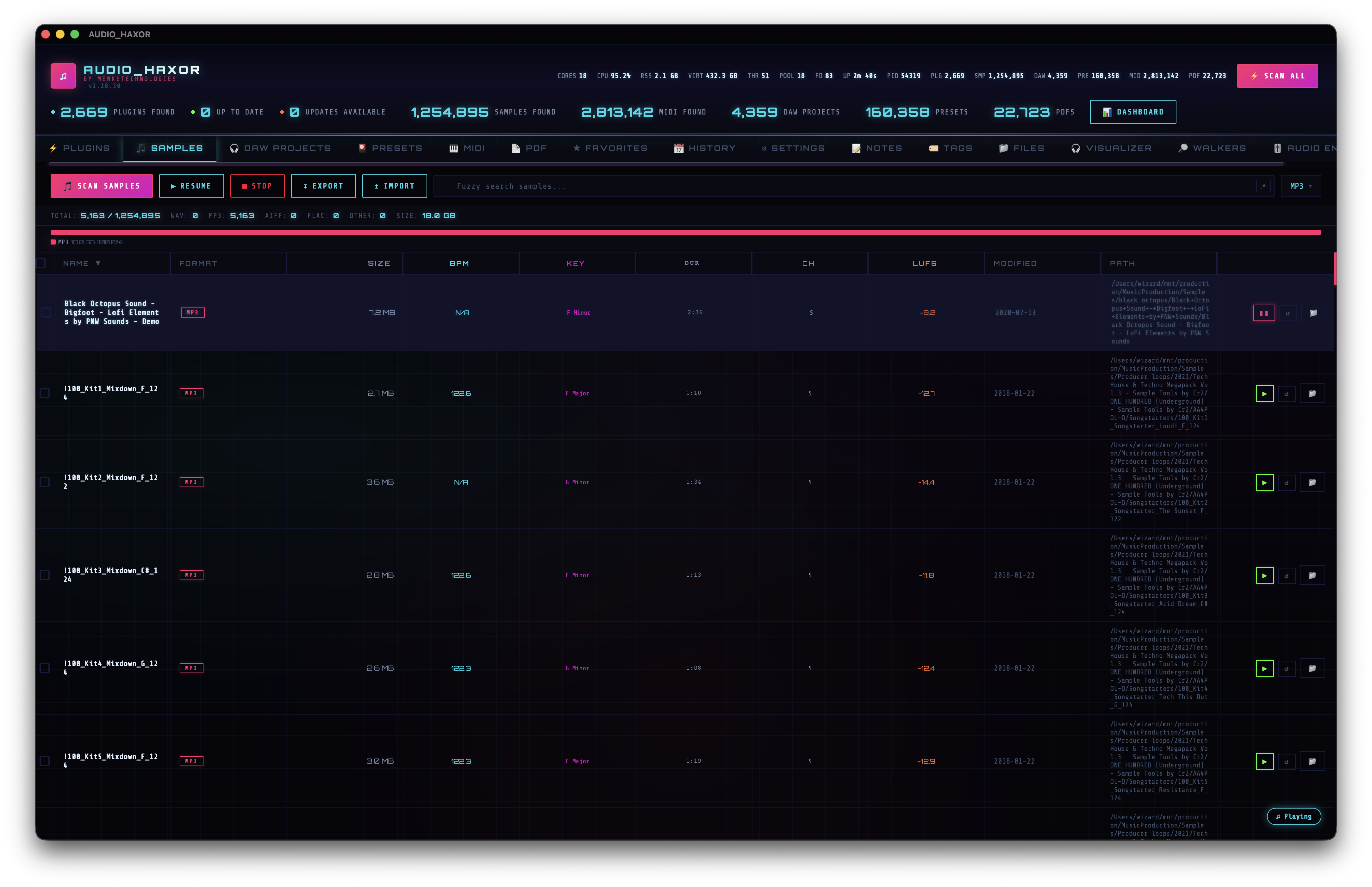
Header controls
- Scan (
scanAudioBtn) — dispatchesscan_audio_samples({ customRoots, excludePaths }). - Resume / Stop — same pattern as plugins.
- Search — fuzzy search (or regex via the toggle). Supports the full FZF query language (
'exact,^prefix,suffix$,!term,a | b). - Format filter — multi-select over WAV, MP3, AIFF, FLAC, OGG, M4A, AAC, OPUS, WMA, REX, RX2, SF2, SFZ.
- Additional filters on sample rate, channel count, folder path — all multi-select widgets.
Table columns
Built by buildAudioRow() in frontend/js/audio.js:3516:
- Checkbox — batch selection for export, delete, favorite, tag.
- Name — with highlight on search match.
- Duration — HH:MM:SS or MM:SS.
- Format — chip-coded.
- Sample rate — e.g. "44.1 kHz", "48 kHz", "96 kHz".
- Channels — mono / stereo / 5.1 / etc.
- Size.
- Modified.
- Path.
- BPM / Key / LUFS — populated by the analysis jobs in step 06.
- Actions — expand metadata, play, reveal in Finder.
Row interactions
- Click — select. If Single-click sample playback is on (Settings → Playback), also starts playback.
- Double-click — if Expand sample row is on, expand the row to reveal the full metadata panel (waveform canvas + spectrogram + BPM / key / LUFS / tags / notes).
- Arrow keys / j / k — navigate. If Play on keyboard selection is on, each selection auto-previews.
- Enter — play.
- Space — play/pause the floating player.
- Drag — native OS drag. Drop into a DAW, another app, or the Files tab (see step 13). Multi-row drag works if you've checkboxed rows.
- Right-click — context menu: Reveal, Copy path, Favorite, Add note, Tag, Find similar, Delete, Export selection, and more.
Waveform preview
Expanding a row triggers decodePeaksViaWorker() at frontend/js/audio.js:202. The decode pipeline has three fallbacks:
- Worker fetch + decode — off-main-thread.
- Main-thread fetch → worker decode — if the worker can't fetch directly.
- Main-thread decode — last resort.
Decoded peaks are cached in _waveformCache (capped by the Max cached waveforms setting). resolveWaveformBoxSize() at frontend/js/audio.js:452 wraps getBoundingClientRect() in an 8-frame rAF retry loop because WKWebView release builds can return 0×0 for briefly-unattached elements.
Spectrogram preview
The expanded row also renders a spectrogram via computeSpectrogramData() in frontend/js/audio-decode-worker.js (~line 34). Algorithm: sliding-window FFT, 1024 bins per frame with 50% hop, mapped to 64 log-spaced frequency bins from ~0 Hz up to Nyquist. Output is a Float32Array heatmap of shape [time][freq], rendered to canvas with an accent-color ramp.
Content duplicates — SHA-256 by size group
Open the Duplicates modal from the tab header or context menu (shortcut Cmd+D). It has two tabs:
- Name duplicates — groups rows by
(name, format). Instant, no scanning. - Content duplicates — click Scan to dispatch
find_content_duplicates. The backend groups files by size first, then SHA-256-hashes any size-collisions (the vast majority of files are unique by size and skip hashing entirely). Progress streams via thecontent-dup-progressevent.
Output: { groups: [{ hash_hex, size_bytes, paths: [{ kind, path }] }], files_hashed, skipped }. Each group is a card listing every duplicate path so you can pick which copy to keep.
Find similar — chromaprint fingerprints
Context menu → Find similar to this (shortcut W). Calls find_similar_samples(filePath, candidatePaths, maxResults: 20) against the fingerprint cache built by build_fingerprint_cache. The backend uses a chromaprint-style acoustic fingerprint so different files that sound the same (different formats, re-encodings, subtle edits) surface as hits, unlike byte-level duplicates.
Build the cache with Cmd+Shift+B or the Build Fingerprint Cache palette action. Cache lives in SQLite and is reused across launches.
Hits land in the Similar Search floating panel — a draggable dock that snaps to any of four corners (similarDock pref: dock-tl / dock-tr / dock-bl / dock-br, default bottom-left). The dock emits a toast.similar_panel_docked toast each time you snap it to a new corner.
Native drag-out to DAW / Finder
Drag any row (or multi-selection) off the table and onto Ableton, Logic, Finder, or any other native OS target. The plumbing lives in frontend/js/native-file-drag.js and uses the tauri-plugin-drag sidecar; on a successful drag-out the app emits a toast.fb_drag_started_n toast so you can see exactly how many files just left the app. Single-file drag works without a checkbox selection — drag the row directly. Multi-file drag fires whenever 2+ rows are checked.
Secure delete
Right-click → Securely delete on any sample row runs a 3-pass DoD 5220.22-M overwrite through the fs_secure_delete Tauri command (src-tauri/src/lib.rs:8567). The same item is available from every inventory tab via the shared _pathDeleteItems() helper (frontend/js/context-menu.js:14). A confirmation dialog (confirm.fb_secure_delete_title) is shown before the wipe; the row is removed from the table only after the file is gone from disk.
Smart playlists
frontend/js/smart-playlists.js. Create a playlist with a rule set; the view is recomputed every time the Samples table re-renders.
Rule types (from matchesSmartRule(), ~line 75):
format— comma-separated formats (WAV,FLAC).bpm_range— min-max (e.g.120-130).tag— note-tag match.favorite— is favorited.recently_played— in the floating player history.name_contains/path_contains— substring.size_min/size_max— MB bounds.key— musical key match (C Major, F# Minor, …).duration_max— seconds.
Set matchMode: 'all' (AND) or 'any' (OR). Playlists persist in prefs, export via Export Smart Playlists (Cmd+Shift+\).
Heatmap dashboard
Press D or run Show Heatmap Dashboard. frontend/js/heatmap-dashboard.js pulls per-type aggregates from db_audio_filter_stats, db_plugin_filter_stats, db_daw_filter_stats, db_preset_filter_stats and renders a draggable grid of cards:
- Format distribution (top 10 by count).
- Size distribution histogram (<100 KB, 100 KB–1 MB, 1–10 MB, 10–50 MB, 50–100 MB, >100 MB).
- Folder heatmap — top directories by file count.
- BPM distribution histogram.
- Key distribution wheel.
- Activity timeline — files per modified month.
- Plugin-type breakdown.
- DAW-format breakdown.
Import / export
- Export JSON —
export_audio_json. - Export DSV (TSV/CSV) —
export_audio_dsv. - Import JSON —
import_audio_json.
db_audio_filter_stats) refreshes the header count so you know how many results match your current query.