02.Configure scan roots
Seven per-scanner directory lists, a shared blacklist, auto-scan / folder-watch / incremental toggles, performance tunables, the customizable shortcut editor, and the built-in color schemes. Most of this tour lives behind Cmd+,.
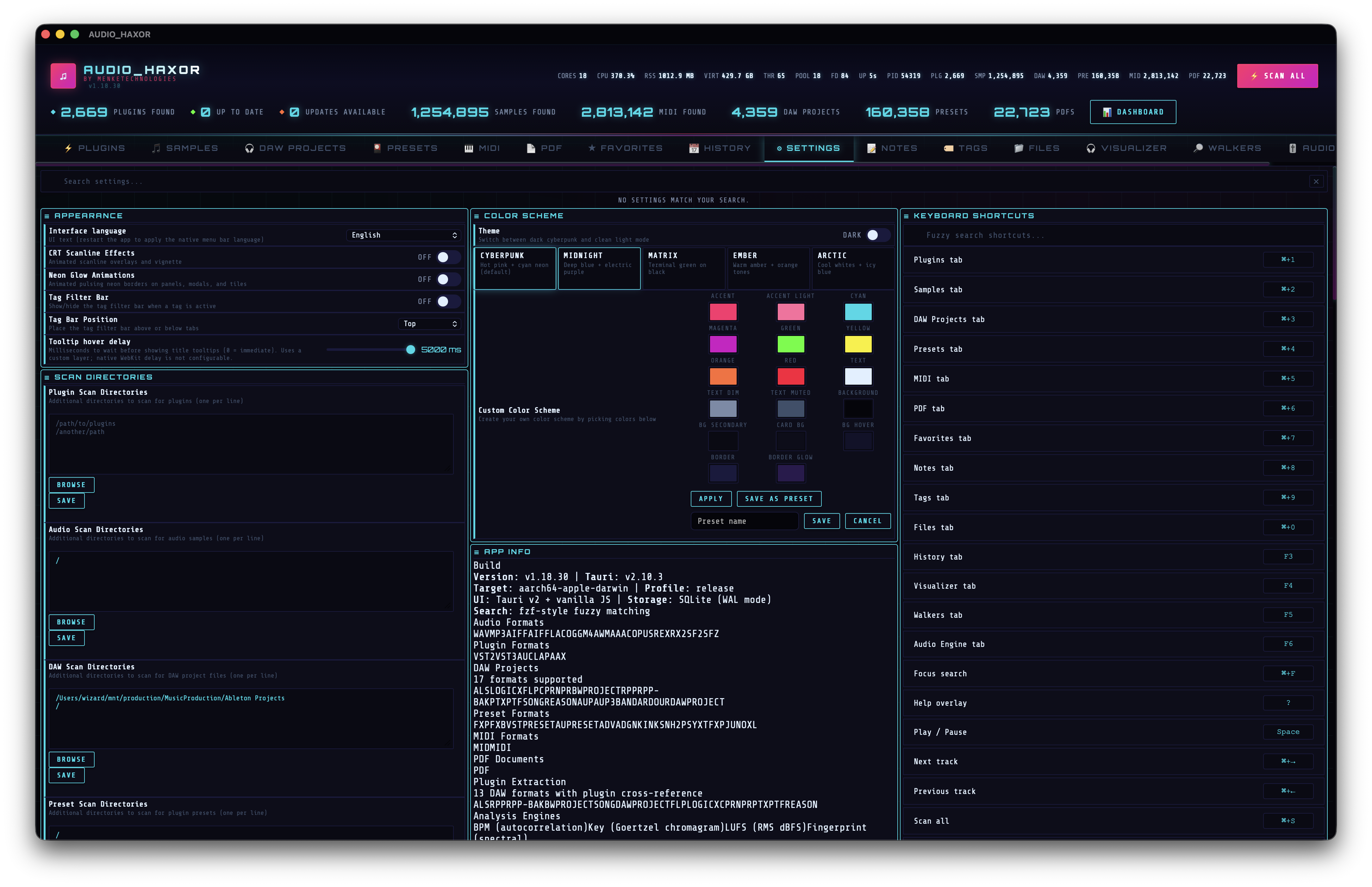
Open Settings + the fuzzy search bar
Press Cmd+, (or click the Settings tab). The first thing you'll see at the top of the page is a fuzzy search input — id="settingsSearchInput", powered by frontend/js/settings-search.js. Type any setting name, label, or description fragment and the page collapses to matching rows only. Examples: "root" jumps straight to the six scan-root textareas, "lufs" reveals analysis toggles, "crt" finds the scanline overlay switch.
Per-scanner scan directories
AUDIO_HAXOR does not use a single unified root list. Each inventory scanner has its own textarea so you can target different trees — e.g. plugins live in /Library/Audio/Plug-Ins/, samples in ~/Music/Samples/, DAW projects in ~/Music/Logic/, PDFs in ~/Documents/Manuals/. Put one absolute path per line. Each textarea has a Browse button that opens the native file dialog for quick appending, plus a Save button that persists the list.
The seven scanner root lists
- Plugin scan directories —
id="settingCustomDirs". Walker uses this for VST/VST3/AU/CLAP discovery viascan_plugins. - Audio scan directories —
id="settingAudioScanDirs". Feedsscan_audio_samples(WAV, MP3, AIFF, FLAC, OGG, M4A, AAC, OPUS, WMA, REX, RX2, SF2, SFZ). - DAW scan directories —
id="settingDawScanDirs". Feedsscan_daw_projectsacross every supported DAW format (see step 07). - Preset scan directories —
id="settingPresetScanDirs". Feedsscan_presetsfor FXP / FXB / VSTPRESET / AUPRESET / ADV / ADG / NKI / NKSN / H2P / SYX / TFX / PJUNOXL. - MIDI scan directories —
id="settingMidiScanDirs". Feedsscan_midi_files. - PDF scan directories —
id="settingPdfScanDirs". Feedsscan_pdfs. - Video scan directories —
id="settingVideoScanDirs". Feedsscan_videos(MP4 / MOV / MKV / AVI / WEBM / M4V / WMV / FLV / MPG / MTS / 3GP). The Videos tab uses these roots; see step 13 for the inventory + audio-route + maximize playback flow.
All seven are also the source of truth for the unified Scan All button — scan_unified walks the union of these lists once and fans progress events into the per-type tabs.
Directory blacklist (shared)
The Directory Blacklist textarea — id="settingBlacklist" — lists directory names (not full paths) that every scanner will skip. Default entries:
#recycle
@eaDir
.Spotlight-V100
$RECYCLE.BIN
System Volume Information
node_modules
.git
.Trash
Add anything that wastes walker time — CI artifacts, build folders, backup directories, Dropbox caches. The list is matched case-sensitively against directory name segments, so node_modules catches it at any depth.
Scanning behavior toggles
- Auto-scan on launch —
data-action="settingToggleAutoScan". When on,scan_unifiedruns immediately after boot. Default off. - Folder watch —
data-action="settingToggleFolderWatch". Enables thenotify-based file watcher (start_file_watcher) that re-runs targeted scans when files change inside configured roots. - Incremental directory scan —
data-action="settingToggleIncrementalDirectoryScan". Instead of re-walking the entire tree, only visit directories whose mtime has changed since the last scan. - Auto check for updates —
data-action="settingToggleAutoUpdate". After plugin scans, automatically queue KVR update checks. - Include Ableton backup & crash sets —
data-action="settingToggleIncludeBackups". By default,.alsfiles in Ableton's Backup and Crash directories are skipped; toggle this on to include them. - Prune old scan snapshots —
settingPruneOldScans, paired with Scan history to keep (settingPruneOldScansKeep, 1–100, default 3). On startup, older completed scan runs beyond the last N per scanner are deleted.
Playback preferences
- Single-click sample playback —
settingSingleClickPlay. Click a Samples row to start playback instead of requiring a double-click. - Play on keyboard selection —
settingAutoPlaySampleOnSelect. When you move the selection withj/k/ arrows in the Samples tab, auto-preview each row. - Expand sample row on double-click —
settingExpandOnClick. Default on. Shows the expanded metadata panel (waveform + spectrogram + full fields). - Show player on startup —
settingShowPlayerOnStartup. Restores the floating player with the last track when the app opens. - Autoplay next track —
settingAutoplayNext. When a track ends, automatically advance. - Autoplay next queue source —
settingAutoplayNextSource. samples (visible Samples table) or player (recently-played history). - Max recently played —
settingMaxRecent, 20–500, default 50.
Performance tunables
These live in the Performance section. Most require a restart (the label says so) because they reconfigure the Rayon pool or SQLite connection pool at boot.
- Table page size — 100–2000, default 200 rows per page for Samples / DAW / Presets / MIDI / PDF tables.
- UI update throttle — 50–1000 ms, default 100. Minimum interval between DOM batches during scans.
- Thread pool multiplier — 1–8, default 4. Threads per CPU core for parallel walks.
- SQLite read pool extra — 0–32, 0 = Auto. Adds extra read-only connections so palette queries / table pagination don't block the writer.
- Channel buffer size — 64–2048, default 512. IPC buffer capacity between scanner threads and the UI.
- Scan batch size — 10–200, default 100. Items per progress batch.
- File descriptor limit — 256–65536, default 10240. Raise if scans abort on huge libraries.
Analysis settings
- Visualizer FPS cap — 10–60 Hz.
- Max cached waveforms — cap for the in-memory waveform-peak cache.
- Auto analyze startup — on startup, queue BPM / key / LUFS batch analysis for un-analyzed samples.
- Analysis pause (seconds) — 0–10, delay before resuming background analysis after user activity.
PDF settings
Background PDF metadata (auto) — settingPdfMetadataAutoExtract. When on, page counts resolve lazily in the background while the PDF tab is visible. When off, use the command palette's Extract PDF metadata action to do a full sweep.
Reset & clear
- Reset UI layout —
settingResetAllUI. Wipes tab order, section order, column widths back to defaults. - Reset tab order — restore the default tab sequence.
- Reset settings layout — restore the default Settings section order.
- Reset columns — restore default column widths for every table.
- Clear all history — wipe every scan history entry across all types.
- Clear KVR cache — forget cached plugin-version / update URLs from KVR.
- Clear analysis cache — wipe cached BPM / key / LUFS values (they'll be recomputed on next access).
- Clear all databases — nuke every inventory table (plugins, audio, DAW, presets, MIDI, PDF) and start from a blank state.
Appearance
- Interface language — locale select backed by the SQLite
app_i18ntable (src-tauri/src/app_i18n.rs) with 27 seeded locales: English, Chinese, Japanese, Korean, German, Czech, Greek, Polish, Spanish, LatAm Spanish, Swedish, Danish, Norwegian, Finnish, French, Hungarian, Italian, Portuguese, Brazilian Portuguese, Romanian, Russian, Dutch, Turkish, Ukrainian, Vietnamese, Indonesian, Hindi. Changes triggerreloadAppStrings(locale)which re-binds every translatable element and refreshes the native menu without a relaunch. - CRT scanline effects — toggle the animated scanline + vignette overlay.
- Neon glow animations — toggle pulsing neon borders on panels, modals, tiles.
- Tag filter bar — show/hide the tag multi-filter widget above (or below) tables.
- Tag bar position — Top or Bottom.
- Tooltip hover delay — 0–5000 ms, default 600 ms. Delay before dense tooltips appear.
Keyboard Shortcuts editor
The Keyboard Shortcuts section of Settings exposes every keybinding in the app (~120 entries — tab switches, scan controls, playback, palette, exports, per-scanner stops, toggle flags) as an editable row. Click a row, press the new chord, hit save. Bindings are merged on top of DEFAULT_SHORTCUT_DEFS in frontend/js/shortcuts.js and persisted under the customShortcuts pref. Reset Shortcuts drops the custom layer and falls back to defaults.
The full list lives behind a search field — type "scan" to find every scanner trigger, "export" to find every export entry, etc. See step 18 for the catalog and pinning recipes.