01.First launch & orientation
Boot sequence, HUD header, process stats strip, tab bar with eighteen surfaces, and the welcome panel that seeds your first scan.
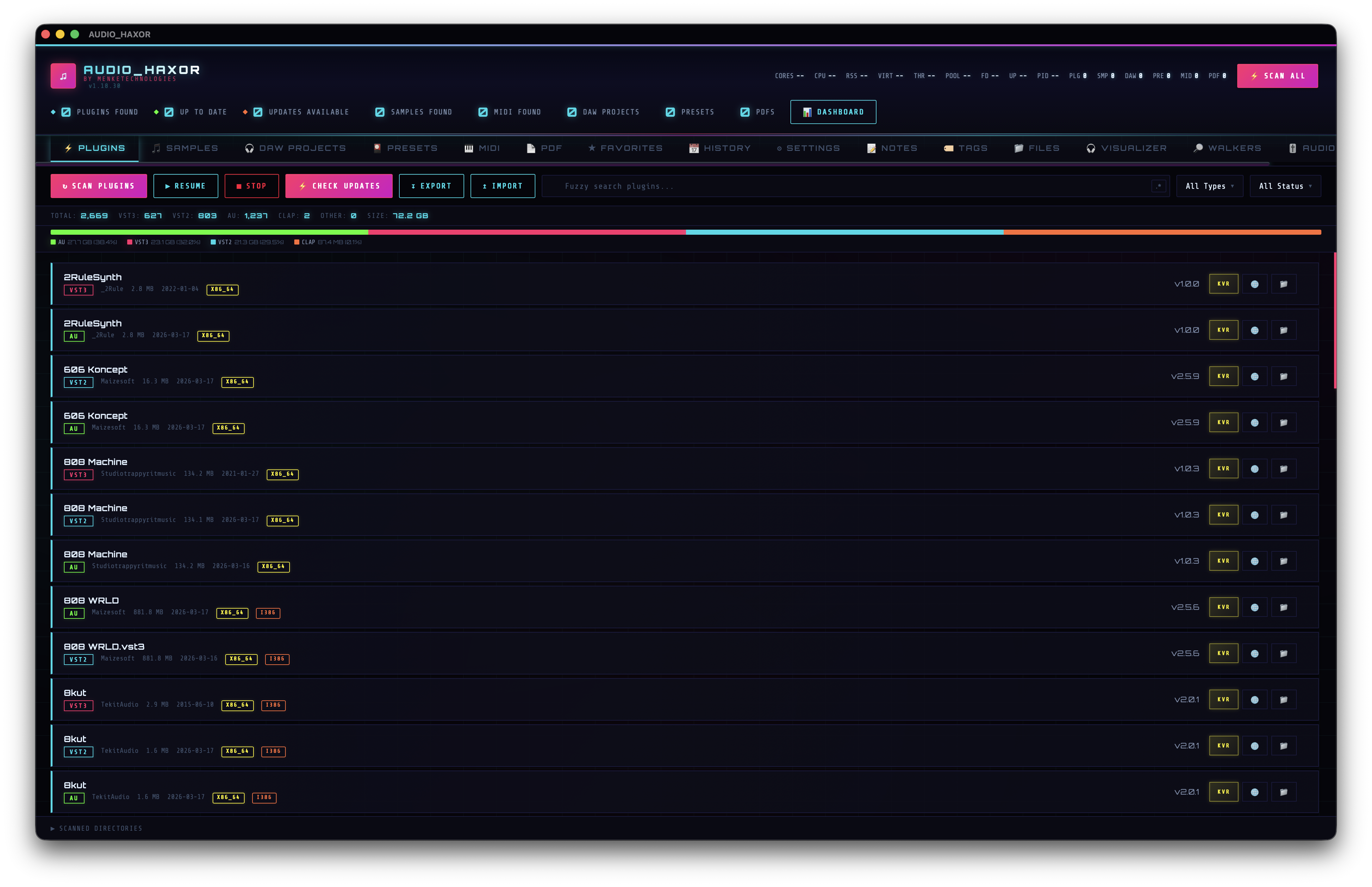
What loads when you open the app
AUDIO_HAXOR is a Tauri v2 desktop app. When you launch it from Applications (macOS), the Start menu (Windows), or your application menu (Linux), the Rust backend in src-tauri/ initializes first: SQLite opens in WAL mode with a single writer and a round-robin read-pool, the walker thread pools spin up, preferences are loaded from the file-backed store, and the audio-engine subprocess is spawned.
Next, the WebView loads frontend/index.html and frontend/js/app.js runs its boot sequence (lines 87–143):
- Show the global progress indicator.
- Load preferences via
prefs.load(). - Fetch i18n strings with
get_app_stringsusing theuiLocalepref. - Hide Stop / Resume all unless a scan is already in progress.
- Restore every setting from preferences.
- Initialize the audio engine output stream.
- Render cache stats (Settings → Database Caches).
- Restore audio player state and dimensions.
- Initialize tab drag-reorder, multi-filters, sort persistence, settings-section drag.
- Load recently-played, global tag bar, xref cache, filter states, FZF search params.
- Initialize smart playlists.
- Show the floating player if Show player on startup is on and history exists.
- Start the folder watcher if Folder watch is enabled.
- Dismiss the splash screen after build info.
- Restore the last active tab.
- Auto-load the first page of every SQLite-backed tab in parallel.
HUD header — what every chip means
The strip across the top is your command center. Left to right:
- Logo & brand — musical note glyph, "AUDIO_HAXOR" wordmark, "by MenkeTechnologies" byline. Version string (
id="appVersion") comes frompackage.json/tauri.conf.json/Cargo.toml, synchronized at build time byscripts/sync-static-build-meta.mjs. Optional git rev shows inid="appGitRev". - Process stats chips — live process telemetry from
get_process_stats:CORES— CPU core countCPU— current usage percentageRSS— resident memoryVIRT— virtual memoryTHR— thread countPOOL— Rayon worker pool sizeFD— open file descriptorsUP— process uptimePID— process ID
- Inventory counters —
PLG · SMP · DAW · PRE · MID · PDF. Populated fromget_active_scan_inventory_counts. - Scan buttons:
Scan All(🗲) —id="btnScanAll", dispatchesscan_unified.Stop All(■) —id="btnStopAll", hidden when idle, visible mid-scan.Resume All(▶) —id="btnResumeAll", only visible when one or more walkers are paused.
- Scan status badge —
id="scanStatusBadge"— free-form status line populated by scanners. - Stats dot row — colored dots for Plugins Found, Up to Date, Updates Available, Samples, MIDI, DAW Projects.
The tab bar — 18 surfaces
Directly under the header, in declared order, with default keyboard bindings where they apply:
Plugins      Cmd+1    Samples      Cmd+2    DAW          Cmd+3
Presets      Cmd+4    MIDI         Cmd+5    PDF          Cmd+6
Videos       (none)   Favorites    Cmd+7    Notes        Cmd+8
Tags         Cmd+9    Files        Cmd+0    History      F3
Visualizer   F4       Walkers      F5       Audio Engine F6
ALS Generator (none)  Crate        (none)   Settings     Cmd+,
Videos, ALS Generator, and Crate are reachable from the tab bar (drag them into any slot you like) and from the command palette (Cmd+K); they do not ship with a default Cmd+N binding because the digit row is already saturated. Rebind any of them in Settings → Keyboard Shortcuts if you want a hotkey.
Tabs are draggable (frontend/js/drag-reorder.js) and the order persists across launches; a drop emits the toast.reordered_main_tabs toast. To reset to defaults use the command palette entry Reset Tab Order.
Active-tab state is persisted — when you relaunch, you land back where you left off. Switching tabs is instantaneous; the per-tab data is loaded lazily via db_query_* calls so a 400 000-row sample library doesn't stall the boot sequence.
The welcome panel
On first launch, the Plugins tab shows a welcome card prompting you to kick off a scan. This card is gated on db_plugin_filter_stats returning zero rows — as soon as any scan finishes, the welcome card disappears and is replaced by the normal table view. You can reproduce the welcome state on any tab by clearing that tab's SQLite table (Settings → Clear All Databases).
First actions — the recommended path
- Press
Cmd+,to open Settings (step 02). - Paste your sample / plugin / DAW / preset / MIDI / PDF roots into the respective Scan Directories textareas. Each scanner has its own list — this is intentional so you can point each walker at a different tree.
- Set up your blacklist (node_modules, .Trash, backups, etc.).
- Return to the main view and hit
Scan Allin the header (step 03). - While the scan runs, switch to the Walkers tab (
F5) to watch live per-walker directory streams.
Survival tips
- Press
?at any time to toggle the help overlay with the full shortcut cheat sheet. - Press
Cmd+Kfor the command palette — every action in the app (including the ~150 entries added across recent releases for per-scanner stops, per-tab export/import, player track actions, and resets) is reachable from there. - If you want a light theme, press
Cmd+Yor hit the Theme button in the HUD header. - If the CRT scanlines distract you, press
F1to toggle them. Neon-glow toggles withF2. - If a scan goes sideways,
Cmd+.stops every active walker and subprocess. - Every keybinding above is rebindable in Settings → Keyboard Shortcuts (~120 customizable entries — see step 18).
macOS platform polish
Several quality-of-life fixes run silently in the background on macOS — you do not configure them, but it’s useful to know they exist when something looks “wrong” and isn’t.
- Mission Control / Spaces previews — on stock WKWebView, switching to Mission Control or moving the window to another Space shows a blank gray thumbnail (WebKit bug 146877, open since 2015). AUDIO_HAXOR layers an
NSImageViewsnapshot above the WebView and refreshes it every 1.5 s while focused, so Mission Control / Cmd-Tab / Spaces grab a real bitmap of what you were just looking at instead of an empty rectangle. The live WebView is unhidden the moment focus returns. Source:src-tauri/src/space_preview_macos.rs. - App Nap mitigation — macOS will throttle, coalesce timers, and (under memory pressure) page out the app after long idle, which makes the first sample playback after walking away for hours lag for several seconds. AUDIO_HAXOR holds an
NSProcessInfoactivity assertion (same option set Music.app uses) so the host stays unthrottled. The laptop can still sleep when you walk away — we just block the Nap throttle, not full system sleep. Theaudio-enginesubprocess gets its own keep-alive: the host pings it every 30 s of idle so JUCE’s pages stay resident. - Tray popover Escape key — the menu-bar popover is a borderless
NSPanel, so its WKWebView rarely becomes first responder and JSkeydownnever fires.tray_popover_escape_macos.rsinstalls a localNSEventmonitor so Escape closes the popover anyway. - Background-mode breadcrumbs —
app.logpicks upAPP BG: resignActive/APP BG: becomeActiveon every focus transition, plusHEALTH+HEALTH-JSlines every 30 s with RSS, IPC counters, JS heap, cache sizes, and audio-engine subprocess vitals. If the app ever feels sluggish, that log +engine.log(which captures stack frames + dyld images on engine SIGSEGV) is the fastest path to a diagnosis.