08.MIDI, presets, PDFs, videos
Four more inventory tabs with their own streaming scanners, column sets, and history. MIDI extracts deep musical metadata; presets are a fast format-filtered catalog; PDFs lazily extract page counts; videos play inline with selectable audio routing.
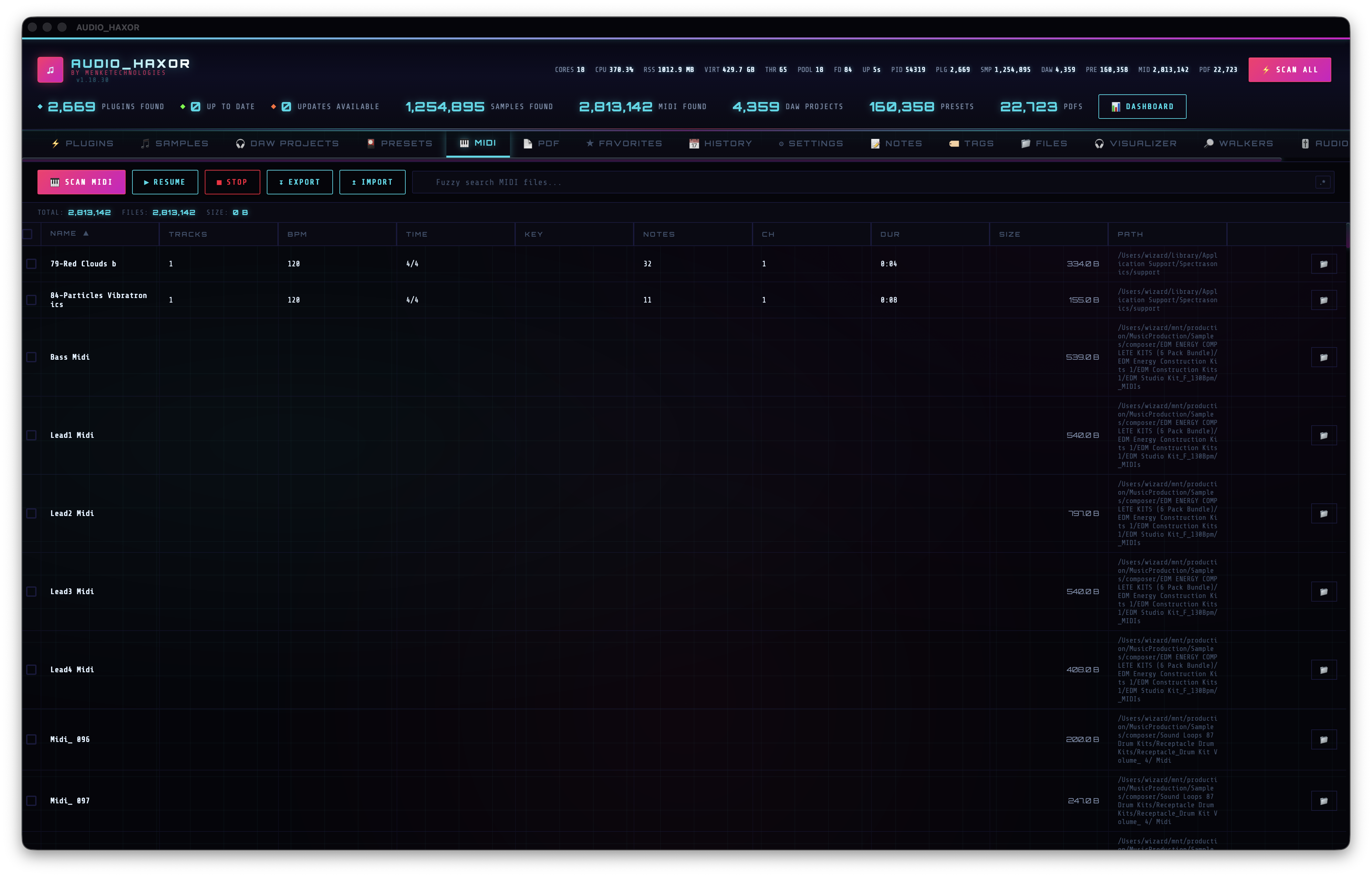
MIDI tab — Cmd+5
frontend/js/midi.js. The widest metadata of any tab — 12 columns:
- Checkbox
- Name (sortable, 22%)
- Tracks — sortable
- BPM — sortable
- Time Signature — sortable
- Key — sortable
- Notes Count — sortable
- Channels — sortable
- Duration — sortable
- Size — sortable
- Path — sortable
- Actions
Header: scan/resume/stop buttons, export/import, fuzzy search (midiSearchInput), regex toggle. The fast columns (name, path, size) come from the initial scan. The slow metadata columns (tracks, BPM, time sig, key, notes count, channels, duration) are populated on demand via get_midi_info({ filePath }) and cached in _midiInfoCache[path] — sorting by any metadata column triggers lazy extraction for the visible page.
Stats: total count (midiCount) and total size (midiTotalSize) in the header. IPC: scan_midi_files, stop_midi_scan, db_query_midi, db_midi_filter_stats, get_midi_info, midi_history_*, export_midi_palette (Cmd+Shift+I).
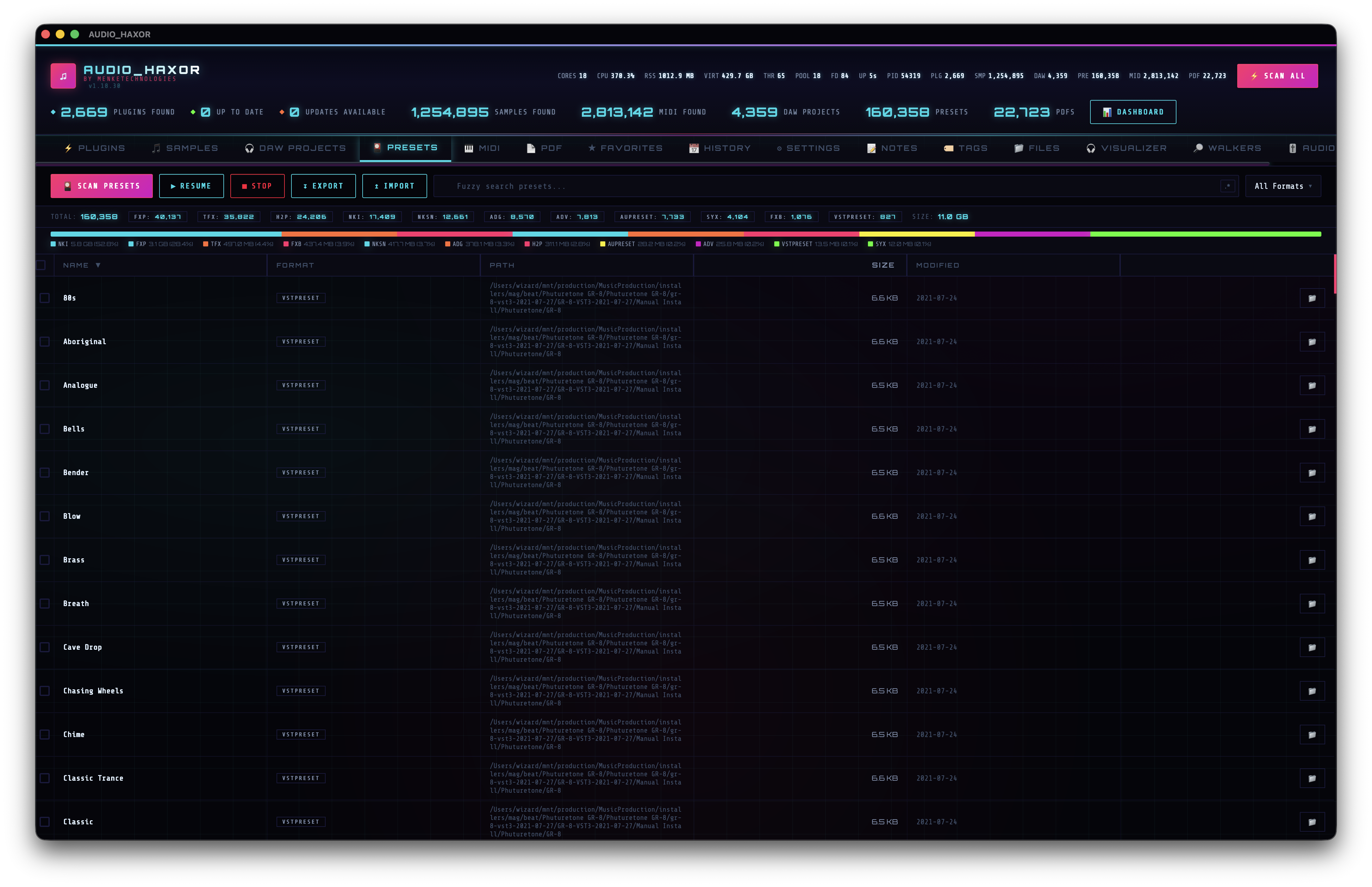
Presets tab — Cmd+4
frontend/js/presets.js. Columns: Checkbox, Name, Format, Path, Size, Modified, Actions. The Format filter multi-select covers:
FXP  FXB  VSTPRESET  AUPRESET  ADV  ADG
NKI  NKSN  H2P  SYX  TFX  PJUNOXL
Header controls: Scan Presets (btnScanPresets), Resume, Stop, Export, Import, fuzzy search (presetSearchInput), regex toggle. Per-row action is Open folder. The tab shows a disk-usage strip at the top with total count, total size, and a per-format breakdown.
IPC: scan_presets, stop_preset_scan, db_query_presets, preset_history_*, export_presets_json, export_presets_dsv, import_presets_json.
Data is paginated — the in-memory buffer holds up to 100 000 rows during scans but the table always renders a page at a time (see Table page size in Settings → Performance).
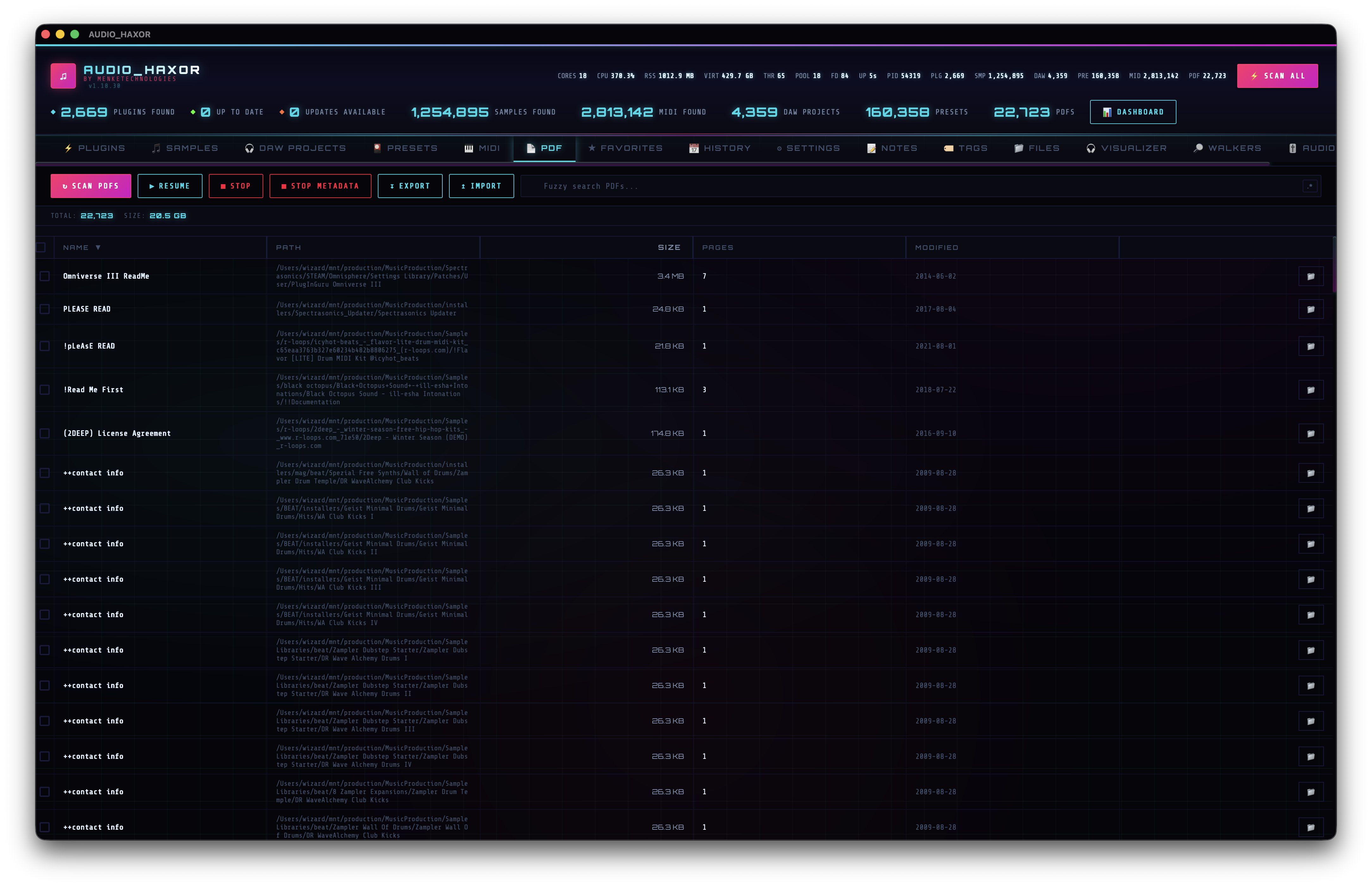
PDF tab — Cmd+6
frontend/js/pdf.js. Columns: Checkbox, Name, Path, Size, Pages, Modified, Actions. The Pages column is special — it's computed by a separate, pauseable metadata extractor.
Scanning and stopping
Header has two Stop buttons: Stop Scan (btnStopPdf) for the file walker, and Stop Metadata Extraction (btnStopPdfMeta) for the page-count extractor. You can stop either independently.
Page-count extraction
- Auto-extract in background —
settingPdfMetadataAutoExtractin Settings. When on,loadPdfPagesForVisible()fetches page counts for the rows currently visible on screen (up to the first 2 000) viapdf_metadata_get. - Full sweep — palette action Extract PDF metadata or shortcut
Cmd+Shift+M— runspdf_metadata_extract_batchagainst every unindexed PDF. Progress streams via Tauri events. Stop withCmd+Shift+Z→pdf_metadata_extract_abort. - Unindexed query —
pdf_metadata_unindexedreturns the list of PDFs that still need page-count extraction.
Opening PDFs
Row action Open uses open_pdf_file({ filePath }). Export DSV / JSON, import JSON, and history/diff work the same as every other tab.
Videos tab — drag into any tab-bar slot
frontend/js/video.js (scanVideos() at line 357). Columns mirror the audio table: Name, Format (MP4 / MOV / MKV / AVI / WEBM / M4V / WMV / FLV / MPG / MTS / 3GP), Duration, Size, Modified, Path. Header carries Scan / Resume / Stop / Export / Import / fuzzy search + regex toggle.
Inline playback & maximize
Click a row to play inline; the row expands into a <video> element. The Maximize button (btnVideoMaximize) toggles a true fullscreen state via requestFullscreen(); the video_toggle_fullscreen shortcut (default v) is a single-key trigger because Cmd+Enter is unreliable inside WKWebView. Press it again or Esc to exit. The maximize root is id="videoFullscreenRoot".
Audio route — engine vs HTML5
The videoAudioRoute pref switches between two pipelines:
- engine (default) — audio is decoded and routed through the AudioEngine subprocess. VST3/AU inserts on the engine's master chain (step 16) apply to video playback. Bypasses the WebView's audio mixer.
- html5 — audio rides the WebView's native
<video>output. Lower latency, no insert chain, no LUFS metering.
Toggle with the command-palette entries Video audio route → AudioEngine (Cmd+Shift+7) / Video audio route → HTML5 (Cmd+Shift+8) or rebind in Settings → Keyboard Shortcuts.
IPC: scan_videos, stop_video_scan, db_query_videos, video_history_*, export_videos_json, export_videos_dsv, import_videos_json. The Videos tab does not appear on the digit-row default keymap — drag the tab into your preferred slot via the main tab bar (the drop emits toast.reordered_main_tabs).
Shared behaviors across all four tabs
- Fuzzy search by default, regex on toggle. Full FZF query syntax supported (
'exact,^prefix,suffix$,!term,a | b). - Click any column header to sort. Sort state is persisted (
sort-persist.js). Default sort per tab is configurable in Settings → Sorting. - Drag columns to reorder, drag their right edge to resize — all widths persist via
columns.js. - Batch selection via row checkboxes +
Cmd+A/Cmd+Shift+Escfor select-all / deselect. - Right-click context menus with per-row actions (reveal, copy path, favorite, add note, export selection).
- History tab (
F3) shows past scans of each type and supports diff.